Last Update: 2026-09-29
ns-3 による Wi-Fi シミュレーション
ns-3
ns-3 は GNU GPLv2 ライセンスで使えるネットワークシミュレーター。 ここでは、ns-3.44 と可視化用のアプリとして NetAnim 3.108 を使ってる。
インストールガイドでは、いろんな OS にインストールできるように書いてあって、macOS と Ubuntu Desktop で試したけど、NetAnim を使うなら Ubuntu Desktop にインストールする方がいいと思う(macOS だと、Wi-Fi フレームの可視化がうまくできなかった)。
Wi-Fi のシミュレーションの結果は、パケットキャプチャファイルとして出力できるし、NetAnim を使ってアニメーションとしても出力できる。さらに、FlowMonitor を使えば、スループット・遅延・パケットロス割合の統計情報も出力できる。
ns-3 を使うメリット
- 実機だと設定が難しかったり、そもそも設定できないパラメーターがあっても、ns-3 なら調整できる可能性が広がる
- 現実世界で Wi-Fi のスループットとかを計測しようとすると、当然ほかの Wi-Fi 電波が干渉してしまうけど、ns-3 なら物理的な干渉を排除できるので再現性が高い
- 学術研究目的でも使えるらしいけど、そこまでじゃなくても、IEEE 802.11 MAC の仕様を学習する目的でも使える
※ ns-3 の Wi-Fi のスコープとか制限は Scope and Limitations に書いてある。例えば 4-Way Handshake はシミュレーションでは観察できないけど、Wi-Fi 接続が完了した後のスループットとかを観察するなら問題ない
ns-3 のインストール
Ubuntu 22.04.5 LTS にインストールした時のコマンド。
cf. https://www.nsnam.org/docs/release/3.44/installation/html/quick-start.html
cf. https://www.nsnam.org/docs/release/3.44/installation/html/linux.html
ishigaki@ishigaki-NS3:~$ sudo apt update

ishigaki@ishigaki-NS3:~$ sudo apt install build-essential libsqlite3-dev libboost-all-dev libssl-dev git python3-setuptools castxml

ishigaki@ishigaki-NS3:~$ sudo apt install gir1.2-goocanvas-2.0 gir1.2-gtk-3.0 libgirepository1.0-dev python3-dev python3-gi python3-gi-cairo python3-pip python3-pygraphviz python3-pygccxml

ishigaki@ishigaki-NS3:~$ sudo apt install g++ pkg-config sqlite3 mercurial ipython3 openmpi-bin openmpi-common openmpi-doc libopenmpi-dev autoconf cvs bzr unrar gdb valgrind uncrustify doxygen graphviz imagemagick python3-sphinx dia tcpdump libxml2 libxml2-dev cmake libc6-dev libc6-dev-i386 automake

ishigaki@ishigaki-NS3:~$ sudo apt install libclang-14-dev llvm-14-dev

ishigaki@ishigaki-NS3:~$ sudo apt install qtbase5-dev qtchooser qt5-qmake qtbase5-dev-tools

ishigaki@ishigaki-NS3:~$ wget -c https://www.nsnam.org/releases/ns-allinone-3.44.tar.bz2

ishigaki@ishigaki-NS3:~$ tar -xvjf ns-allinone-3.44.tar.bz2

ishigaki@ishigaki-NS3:~$ cd ns-allinone-3.44/ns-3.44/

ishigaki@ishigaki-NS3:~/ns-allinone-3.44/ns-3.44$ cat VERSION
3.44

ishigaki@ishigaki-NS3:~/ns-allinone-3.44/ns-3.44$ ./ns3 configure --enable-examples --enable-tests

ishigaki@ishigaki-NS3:~/ns-allinone-3.44/ns-3.44$ ./ns3 build

ishigaki@ishigaki-NS3:~/ns-allinone-3.44/ns-3.44$ ./ns3 run hello-simulator
Hello Simulator
NetAnim のインストール
すでに netanim-3.109 がダウンロードできてそう(↓)だけど、NetAnim は参考書籍: Advanced Network Simulations Simplified とバージョンを合わせたいので、netanim-3.108 が欲しい。
ishigaki@ishigaki-NS3:~/ns-allinone-3.44/ns-3.44$ ls -l ../netanim-3.109/
total 24
-rw-rw-r-- 1 ishigaki ishigaki 6752  3月 10 08:55 CMakeLists.txt
drwxrwxr-x 2 ishigaki ishigaki 4096  7月  8 17:00 data
-rw-rw-r-- 1 ishigaki ishigaki 3331  3月 10 08:55 RELEASE_NOTES.md
drwxrwxr-x 2 ishigaki ishigaki 4096  7月  8 17:00 resources
drwxrwxr-x 3 ishigaki ishigaki 4096  7月  8 17:00 src
上の続きで、NetAnim をインストールした時のコマンド。
cf. https://www.nsnam.org/wiki/NetAnim_3.108
ishigaki@ishigaki-NS3:~/ns-allinone-3.44/ns-3.44$ hg clone http://code.nsnam.org/netanim
real URL is https://code.nsnam.org/netanim
destination directory: netanim
requesting all changes
adding changesets
adding manifests
adding file changes
added 305 changesets with 1609 changes to 228 files
new changesets 9307cbf67965:7b4d3db98f92
updating to branch default
195 files updated, 0 files merged, 0 files removed, 0 files unresolved

ishigaki@ishigaki-NS3:~/ns-allinone-3.44/ns-3.44$ cd netanim/

ishigaki@ishigaki-NS3:~/ns-allinone-3.44/ns-3.44/netanim$ hg tags
tip                              304:7b4d3db98f92
netanim-3.108                    303:2ce82d2b8afd
netanim-3.107                    295:03c27126bae3
netanim-3.106                    285:43f60d3846ec
netanim-3.105                    252:c9866156ebf3

ishigaki@ishigaki-NS3:~/ns-allinone-3.44/ns-3.44/netanim$ hg id -t
tip

ishigaki@ishigaki-NS3:~/ns-allinone-3.44/ns-3.44/netanim$ hg update netanim-3.108
1 files updated, 0 files merged, 0 files removed, 0 files unresolved

ishigaki@ishigaki-NS3:~/ns-allinone-3.44/ns-3.44/netanim$ hg id -t
netanim-3.108

ishigaki@ishigaki-NS3:~/ns-allinone-3.44/ns-3.44/netanim$ make clean
make: *** No rule to make target 'clean'.  Stop.

ishigaki@ishigaki-NS3:~/ns-allinone-3.44/ns-3.44/netanim$ qmake NetAnim.pro
Info: creating stash file /home/ishigaki/ns-allinone-3.44/ns-3.44/netanim/.qmake.stash

ishigaki@ishigaki-NS3:~/ns-allinone-3.44/ns-3.44/netanim$ ls -l Makefile
-rw-rw-r-- 1 ishigaki ishigaki 75494  7月  9 08:46 Makefile

ishigaki@ishigaki-NS3:~/ns-allinone-3.44/ns-3.44/netanim$ make -j$(nproc)

ishigaki@ishigaki-NS3:~/ns-allinone-3.44/ns-3.44/netanim$ ls -l NetAnim
-rwxrwxr-x 1 ishigaki ishigaki 2898528  7月  9 08:48 NetAnim
サンプルシミュレーションの実行
ns-3 にはサンプルシミュレーションもたくさん同梱されていて、シミュレーションコードを書く前に、サンプルではどのように書かれているかをみておく方がいいかも。
まずはそのうちの 1 つを実行してみる。下記の examples/wireless/wifi-80211e-txop.cc は、IEEE 802.11e の TXOP limit を変えると、スループットがどう変わるかを比べるサンプル。
examples/wireless/wifi-80211e-txop.cc
/*
 * Copyright (c) 2016 Sébastien Deronne
 *
 * SPDX-License-Identifier: GPL-2.0-only
 *
 * Author: Sébastien Deronne <sebastien.deronne@gmail.com>
 */

#include "ns3/command-line.h"
#include "ns3/internet-stack-helper.h"
#include "ns3/ipv4-address-helper.h"
#include "ns3/log.h"
#include "ns3/mobility-helper.h"
#include "ns3/on-off-helper.h"
#include "ns3/pointer.h"
#include "ns3/qos-txop.h"
#include "ns3/ssid.h"
#include "ns3/string.h"
#include "ns3/udp-client-server-helper.h"
#include "ns3/udp-server.h"
#include "ns3/wifi-mac.h"
#include "ns3/wifi-net-device.h"
#include "ns3/yans-wifi-channel.h"
#include "ns3/yans-wifi-helper.h"

// This is an example that illustrates 802.11 QoS for different Access Categories.
// It defines 4 independent Wi-Fi networks (working on different logical channels
// on the same "ns3::YansWifiPhy" channel object).
// Each network contains one access point and one station. Each station continuously
// transmits data packets to its respective AP.
//
// Network topology (numbers in parentheses are channel numbers):
//
//  BSS A (36)        BSS B (40)       BSS C (44)        BSS D (48)
//   *      *          *      *         *      *          *      *
//   |      |          |      |         |      |          |      |
//  AP A   STA A      AP B   STA B     AP C   STA C      AP D   STA D
//
// The configuration is the following on the 4 networks:
// - STA A sends AC_BE traffic to AP A with default AC_BE TXOP value of 0 (1 MSDU);
// - STA B sends AC_BE traffic to AP B with non-default AC_BE TXOP of 4096 us;
// - STA C sends AC_VI traffic to AP C with default AC_VI TXOP of 4096 us;
// - STA D sends AC_VI traffic to AP D with non-default AC_VI TXOP value of 0 (1 MSDU);
//
// The user can select the distance between the stations and the APs, can enable/disable the RTS/CTS
// mechanism and can choose the payload size and the simulation duration. Example: ./ns3 run
// "wifi-80211e-txop --distance=10 --simulationTime=20s --payloadSize=1000"
//
// The output prints the throughput measured for the 4 cases/networks described above. When TXOP is
// enabled, results show increased throughput since the channel is granted for a longer duration.
// TXOP is enabled by default for AC_VI and AC_VO, so that they can use the channel for a longer
// duration than AC_BE and AC_BK.

using namespace ns3;

NS_LOG_COMPONENT_DEFINE("80211eTxop");

/**
 * Keeps the maximum duration among all TXOPs
 */
struct TxopDurationTracer
{
    /**
     * Callback connected to TXOP duration trace source.
     *
     * @param startTime TXOP start time
     * @param duration TXOP duration
     * @param linkId the ID of the link
     */
    void Trace(Time startTime, Time duration, uint8_t linkId);
    Time m_max; //!< maximum TXOP duration
};

void
TxopDurationTracer::Trace(Time startTime, Time duration, uint8_t linkId)
{
    if (duration > m_max)
    {
        m_max = duration;
    }
}

int
main(int argc, char* argv[])
{
    uint32_t payloadSize{1472}; // bytes
    Time simulationTime{"10s"};
    meter_u distance{5};
    bool enablePcap{false};
    bool verifyResults{false}; // used for regression
    Time txopLimit{"4096us"};

    CommandLine cmd(__FILE__);
    cmd.AddValue("payloadSize", "Payload size in bytes", payloadSize);
    cmd.AddValue("simulationTime", "Simulation time", simulationTime);
    cmd.AddValue("distance",
                 "Distance in meters between the station and the access point",
                 distance);
    cmd.AddValue("enablePcap", "Enable/disable pcap file generation", enablePcap);
    cmd.AddValue("verifyResults",
                 "Enable/disable results verification at the end of the simulation",
                 verifyResults);
    cmd.Parse(argc, argv);

    NodeContainer wifiStaNodes;
    wifiStaNodes.Create(4);
    NodeContainer wifiApNodes;
    wifiApNodes.Create(4);

    YansWifiChannelHelper channel = YansWifiChannelHelper::Default();
    YansWifiPhyHelper phy;
    phy.SetPcapDataLinkType(WifiPhyHelper::DLT_IEEE802_11_RADIO);
    phy.SetChannel(channel.Create());

    WifiHelper wifi;
    wifi.SetStandard(WIFI_STANDARD_80211a);
    wifi.SetRemoteStationManager("ns3::IdealWifiManager");
    WifiMacHelper mac;

    NetDeviceContainer staDeviceA;
    NetDeviceContainer staDeviceB;
    NetDeviceContainer staDeviceC;
    NetDeviceContainer staDeviceD;
    NetDeviceContainer apDeviceA;
    NetDeviceContainer apDeviceB;
    NetDeviceContainer apDeviceC;
    NetDeviceContainer apDeviceD;
    Ssid ssid;

    // Network A
    ssid = Ssid("network-A");
    phy.Set("ChannelSettings", StringValue("{36, 20, BAND_5GHZ, 0}"));
    mac.SetType("ns3::StaWifiMac", "QosSupported", BooleanValue(true), "Ssid", SsidValue(ssid));
    staDeviceA = wifi.Install(phy, mac, wifiStaNodes.Get(0));

    mac.SetType("ns3::ApWifiMac",
                "QosSupported",
                BooleanValue(true),
                "Ssid",
                SsidValue(ssid),
                "EnableBeaconJitter",
                BooleanValue(false));
    apDeviceA = wifi.Install(phy, mac, wifiApNodes.Get(0));

    // Network B
    ssid = Ssid("network-B");
    phy.Set("ChannelSettings", StringValue("{40, 20, BAND_5GHZ, 0}"));
    mac.SetType("ns3::StaWifiMac", "QosSupported", BooleanValue(true), "Ssid", SsidValue(ssid));

    staDeviceB = wifi.Install(phy, mac, wifiStaNodes.Get(1));

    mac.SetType("ns3::ApWifiMac",
                "QosSupported",
                BooleanValue(true),
                "Ssid",
                SsidValue(ssid),
                "EnableBeaconJitter",
                BooleanValue(false));
    apDeviceB = wifi.Install(phy, mac, wifiApNodes.Get(1));

    // Modify EDCA configuration (TXOP limit) for AC_BE
    Ptr<NetDevice> dev = wifiApNodes.Get(1)->GetDevice(0);
    Ptr<WifiNetDevice> wifi_dev = DynamicCast<WifiNetDevice>(dev);
    Ptr<WifiMac> wifi_mac = wifi_dev->GetMac();
    PointerValue ptr;
    Ptr<QosTxop> edca;
    wifi_mac->GetAttribute("BE_Txop", ptr);
    edca = ptr.Get<QosTxop>();
    edca->SetTxopLimit(txopLimit);

    // Trace TXOP duration for BE on STA1
    dev = wifiStaNodes.Get(1)->GetDevice(0);
    wifi_dev = DynamicCast<WifiNetDevice>(dev);
    wifi_mac = wifi_dev->GetMac();
    wifi_mac->GetAttribute("BE_Txop", ptr);
    edca = ptr.Get<QosTxop>();
    TxopDurationTracer beTxopTracer;
    edca->TraceConnectWithoutContext("TxopTrace",
                                     MakeCallback(&TxopDurationTracer::Trace, &beTxopTracer));

    // Network C
    ssid = Ssid("network-C");
    phy.Set("ChannelSettings", StringValue("{44, 20, BAND_5GHZ, 0}"));
    mac.SetType("ns3::StaWifiMac", "QosSupported", BooleanValue(true), "Ssid", SsidValue(ssid));

    staDeviceC = wifi.Install(phy, mac, wifiStaNodes.Get(2));

    mac.SetType("ns3::ApWifiMac",
                "QosSupported",
                BooleanValue(true),
                "Ssid",
                SsidValue(ssid),
                "EnableBeaconJitter",
                BooleanValue(false));
    apDeviceC = wifi.Install(phy, mac, wifiApNodes.Get(2));

    // Trace TXOP duration for VI on STA2
    dev = wifiStaNodes.Get(2)->GetDevice(0);
    wifi_dev = DynamicCast<WifiNetDevice>(dev);
    wifi_mac = wifi_dev->GetMac();
    wifi_mac->GetAttribute("VI_Txop", ptr);
    edca = ptr.Get<QosTxop>();
    TxopDurationTracer viTxopTracer;
    edca->TraceConnectWithoutContext("TxopTrace",
                                     MakeCallback(&TxopDurationTracer::Trace, &viTxopTracer));

    // Network D
    ssid = Ssid("network-D");
    phy.Set("ChannelSettings", StringValue("{48, 20, BAND_5GHZ, 0}"));
    mac.SetType("ns3::StaWifiMac", "QosSupported", BooleanValue(true), "Ssid", SsidValue(ssid));

    staDeviceD = wifi.Install(phy, mac, wifiStaNodes.Get(3));

    mac.SetType("ns3::ApWifiMac",
                "QosSupported",
                BooleanValue(true),
                "Ssid",
                SsidValue(ssid),
                "EnableBeaconJitter",
                BooleanValue(false));
    apDeviceD = wifi.Install(phy, mac, wifiApNodes.Get(3));

    // Modify EDCA configuration (TXOP limit) for AC_VO
    dev = wifiApNodes.Get(3)->GetDevice(0);
    wifi_dev = DynamicCast<WifiNetDevice>(dev);
    wifi_mac = wifi_dev->GetMac();
    wifi_mac->GetAttribute("VI_Txop", ptr);
    edca = ptr.Get<QosTxop>();
    edca->SetTxopLimit(MicroSeconds(0));

    /* Setting mobility model */
    MobilityHelper mobility;
    Ptr<ListPositionAllocator> positionAlloc = CreateObject<ListPositionAllocator>();
    mobility.SetMobilityModel("ns3::ConstantPositionMobilityModel");

    // Set position for APs
    positionAlloc->Add(Vector(0.0, 0.0, 0.0));
    positionAlloc->Add(Vector(10.0, 0.0, 0.0));
    positionAlloc->Add(Vector(20.0, 0.0, 0.0));
    positionAlloc->Add(Vector(30.0, 0.0, 0.0));
    // Set position for STAs
    positionAlloc->Add(Vector(distance, 0.0, 0.0));
    positionAlloc->Add(Vector(10 + distance, 0.0, 0.0));
    positionAlloc->Add(Vector(20 + distance, 0.0, 0.0));
    positionAlloc->Add(Vector(30 + distance, 0.0, 0.0));
    // Remark: while we set these positions 10 meters apart, the networks do not interact
    // and the only variable that affects transmission performance is the distance.

    mobility.SetPositionAllocator(positionAlloc);
    mobility.Install(wifiApNodes);
    mobility.Install(wifiStaNodes);

    /* Internet stack */
    InternetStackHelper stack;
    stack.Install(wifiApNodes);
    stack.Install(wifiStaNodes);

    Ipv4AddressHelper address;
    address.SetBase("192.168.1.0", "255.255.255.0");
    Ipv4InterfaceContainer StaInterfaceA;
    StaInterfaceA = address.Assign(staDeviceA);
    Ipv4InterfaceContainer ApInterfaceA;
    ApInterfaceA = address.Assign(apDeviceA);

    address.SetBase("192.168.2.0", "255.255.255.0");
    Ipv4InterfaceContainer StaInterfaceB;
    StaInterfaceB = address.Assign(staDeviceB);
    Ipv4InterfaceContainer ApInterfaceB;
    ApInterfaceB = address.Assign(apDeviceB);

    address.SetBase("192.168.3.0", "255.255.255.0");
    Ipv4InterfaceContainer StaInterfaceC;
    StaInterfaceC = address.Assign(staDeviceC);
    Ipv4InterfaceContainer ApInterfaceC;
    ApInterfaceC = address.Assign(apDeviceC);

    address.SetBase("192.168.4.0", "255.255.255.0");
    Ipv4InterfaceContainer StaInterfaceD;
    StaInterfaceD = address.Assign(staDeviceD);
    Ipv4InterfaceContainer ApInterfaceD;
    ApInterfaceD = address.Assign(apDeviceD);

    /* Setting applications */
    uint16_t port = 5001;
    UdpServerHelper serverA(port);
    ApplicationContainer serverAppA = serverA.Install(wifiApNodes.Get(0));
    serverAppA.Start(Seconds(0));
    serverAppA.Stop(simulationTime + Seconds(1));

    InetSocketAddress destA(ApInterfaceA.GetAddress(0), port);

    OnOffHelper clientA("ns3::UdpSocketFactory", destA);
    clientA.SetAttribute("OnTime", StringValue("ns3::ConstantRandomVariable[Constant=1]"));
    clientA.SetAttribute("OffTime", StringValue("ns3::ConstantRandomVariable[Constant=0]"));
    clientA.SetAttribute("DataRate", StringValue("100000kb/s"));
    clientA.SetAttribute("PacketSize", UintegerValue(payloadSize));
    clientA.SetAttribute("Tos", UintegerValue(0x70)); // AC_BE

    ApplicationContainer clientAppA = clientA.Install(wifiStaNodes.Get(0));
    clientAppA.Start(Seconds(1));
    clientAppA.Stop(simulationTime + Seconds(1));

    UdpServerHelper serverB(port);
    ApplicationContainer serverAppB = serverB.Install(wifiApNodes.Get(1));
    serverAppB.Start(Seconds(0));
    serverAppB.Stop(simulationTime + Seconds(1));

    InetSocketAddress destB(ApInterfaceB.GetAddress(0), port);

    OnOffHelper clientB("ns3::UdpSocketFactory", destB);
    clientB.SetAttribute("OnTime", StringValue("ns3::ConstantRandomVariable[Constant=1]"));
    clientB.SetAttribute("OffTime", StringValue("ns3::ConstantRandomVariable[Constant=0]"));
    clientB.SetAttribute("DataRate", StringValue("100000kb/s"));
    clientB.SetAttribute("PacketSize", UintegerValue(payloadSize));
    clientB.SetAttribute("Tos", UintegerValue(0x70)); // AC_BE

    ApplicationContainer clientAppB = clientB.Install(wifiStaNodes.Get(1));
    clientAppB.Start(Seconds(1));
    clientAppB.Stop(simulationTime + Seconds(1));

    UdpServerHelper serverC(port);
    ApplicationContainer serverAppC = serverC.Install(wifiApNodes.Get(2));
    serverAppC.Start(Seconds(0));
    serverAppC.Stop(simulationTime + Seconds(1));

    InetSocketAddress destC(ApInterfaceC.GetAddress(0), port);

    OnOffHelper clientC("ns3::UdpSocketFactory", destC);
    clientC.SetAttribute("OnTime", StringValue("ns3::ConstantRandomVariable[Constant=1]"));
    clientC.SetAttribute("OffTime", StringValue("ns3::ConstantRandomVariable[Constant=0]"));
    clientC.SetAttribute("DataRate", StringValue("100000kb/s"));
    clientC.SetAttribute("PacketSize", UintegerValue(payloadSize));
    clientC.SetAttribute("Tos", UintegerValue(0xb8)); // AC_VI

    ApplicationContainer clientAppC = clientC.Install(wifiStaNodes.Get(2));
    clientAppC.Start(Seconds(1));
    clientAppC.Stop(simulationTime + Seconds(1));

    UdpServerHelper serverD(port);
    ApplicationContainer serverAppD = serverD.Install(wifiApNodes.Get(3));
    serverAppD.Start(Seconds(0));
    serverAppD.Stop(simulationTime + Seconds(1));

    InetSocketAddress destD(ApInterfaceD.GetAddress(0), port);

    OnOffHelper clientD("ns3::UdpSocketFactory", destD);
    clientD.SetAttribute("OnTime", StringValue("ns3::ConstantRandomVariable[Constant=1]"));
    clientD.SetAttribute("OffTime", StringValue("ns3::ConstantRandomVariable[Constant=0]"));
    clientD.SetAttribute("DataRate", StringValue("100000kb/s"));
    clientD.SetAttribute("PacketSize", UintegerValue(payloadSize));
    clientD.SetAttribute("Tos", UintegerValue(0xb8)); // AC_VI

    ApplicationContainer clientAppD = clientD.Install(wifiStaNodes.Get(3));
    clientAppD.Start(Seconds(1));
    clientAppD.Stop(simulationTime + Seconds(1));

    if (enablePcap)
    {
        phy.EnablePcap("AP_A", apDeviceA.Get(0));
        phy.EnablePcap("STA_A", staDeviceA.Get(0));
        phy.EnablePcap("AP_B", apDeviceB.Get(0));
        phy.EnablePcap("STA_B", staDeviceB.Get(0));
        phy.EnablePcap("AP_C", apDeviceC.Get(0));
        phy.EnablePcap("STA_C", staDeviceC.Get(0));
        phy.EnablePcap("AP_D", apDeviceD.Get(0));
        phy.EnablePcap("STA_D", staDeviceD.Get(0));
    }

    Simulator::Stop(simulationTime + Seconds(1));
    Simulator::Run();

    /* Show results */
    double totalPacketsThroughA = DynamicCast<UdpServer>(serverAppA.Get(0))->GetReceived();
    double totalPacketsThroughB = DynamicCast<UdpServer>(serverAppB.Get(0))->GetReceived();
    double totalPacketsThroughC = DynamicCast<UdpServer>(serverAppC.Get(0))->GetReceived();
    double totalPacketsThroughD = DynamicCast<UdpServer>(serverAppD.Get(0))->GetReceived();

    Simulator::Destroy();

    auto throughput = totalPacketsThroughA * payloadSize * 8 / simulationTime.GetMicroSeconds();
    std::cout << "AC_BE with default TXOP limit (0ms): " << '\n'
              << "  Throughput = " << throughput << " Mbit/s" << '\n';
    if (verifyResults && (throughput < 28 || throughput > 29))
    {
        NS_LOG_ERROR("Obtained throughput " << throughput << " is not in the expected boundaries!");
        exit(1);
    }

    throughput = totalPacketsThroughB * payloadSize * 8 / simulationTime.GetMicroSeconds();
    std::cout << "AC_BE with non-default TXOP limit (4.096ms): " << '\n'
              << "  Throughput = " << throughput << " Mbit/s" << '\n';
    if (verifyResults && (throughput < 36.5 || throughput > 37))
    {
        NS_LOG_ERROR("Obtained throughput " << throughput << " is not in the expected boundaries!");
        exit(1);
    }
    std::cout << "  Maximum TXOP duration = " << beTxopTracer.m_max.GetMicroSeconds() << " us"
              << '\n';
    if (verifyResults &&
        (beTxopTracer.m_max < MicroSeconds(3008) || beTxopTracer.m_max > txopLimit))
    {
        NS_LOG_ERROR("Maximum TXOP duration " << beTxopTracer.m_max
                                              << " is not in the expected boundaries!");
        exit(1);
    }

    throughput = totalPacketsThroughC * payloadSize * 8 / simulationTime.GetMicroSeconds();
    std::cout << "AC_VI with default TXOP limit (4.096ms): " << '\n'
              << "  Throughput = " << throughput << " Mbit/s" << '\n';
    if (verifyResults && (throughput < 36.5 || throughput > 37.5))
    {
        NS_LOG_ERROR("Obtained throughput " << throughput << " is not in the expected boundaries!");
        exit(1);
    }
    std::cout << "  Maximum TXOP duration = " << viTxopTracer.m_max.GetMicroSeconds() << " us"
              << '\n';
    if (verifyResults &&
        (viTxopTracer.m_max < MicroSeconds(3008) || viTxopTracer.m_max > txopLimit))
    {
        NS_LOG_ERROR("Maximum TXOP duration " << viTxopTracer.m_max
                                              << " is not in the expected boundaries!");
        exit(1);
    }

    throughput = totalPacketsThroughD * payloadSize * 8 / simulationTime.GetMicroSeconds();
    std::cout << "AC_VI with non-default TXOP limit (0ms): " << '\n'
              << "  Throughput = " << throughput << " Mbit/s" << '\n';
    if (verifyResults && (throughput < 31.5 || throughput > 32.5))
    {
        NS_LOG_ERROR("Obtained throughput " << throughput << " is not in the expected boundaries!");
        exit(1);
    }

    return 0;
}
サンプルは ./ns3 run にファイルのパスを渡せば実行できる(ビルドが必要なら先にビルドしてくれる)。
実行結果
ishigaki@ishigaki-NS3:~/ns-allinone-3.44/ns-3.44$ ./ns3 run examples/wireless/wifi-80211e-txop.cc
AC_BE with default TXOP limit (0ms):
  Throughput = 28.8877 Mbit/s
AC_BE with non-default TXOP limit (4.096ms):
  Throughput = 36.8224 Mbit/s
  Maximum TXOP duration = 4056 us
AC_VI with default TXOP limit (4.096ms):
  Throughput = 37.211 Mbit/s
  Maximum TXOP duration = 4056 us
AC_VI with non-default TXOP limit (0ms):
  Throughput = 32.5076 Mbit/s
シミュレーション結果の出力
シミュレーションの実行結果を出力するために必要なコードを見ていく。
元にするコードは下記の scratch/wireless-simple.cc で、出力は何もない。
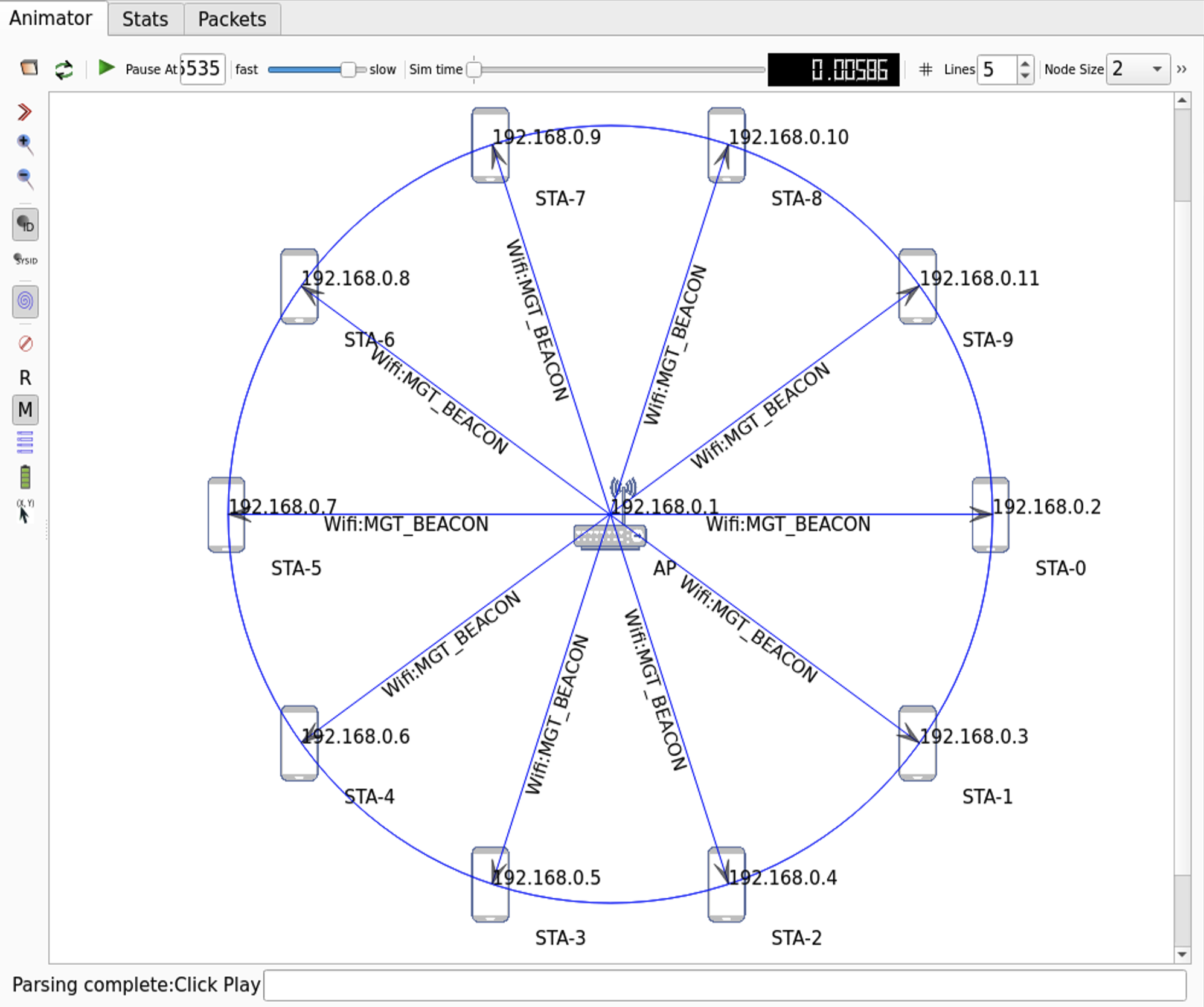
シミュレーション内容は、
1 つの AP を中心として 10m 離れた円周上に、36°ごとに動かない STA が 10 個並んでる状況
で、
それぞれの STA が 802.11ac/80MHz/2SS で接続して、60Mbps で AP に UDP データを 10 秒間送信し続ける
ようにしてる。イメージ図は下記の通り(NetAnim で出力)。
scratch/wireless-simple.cc
#include "ns3/applications-module.h"
#include "ns3/core-module.h"
#include "ns3/csma-module.h"
#include "ns3/internet-module.h"
#include "ns3/mobility-module.h"
#include "ns3/network-module.h"
#include "ns3/ssid.h"
#include "ns3/yans-wifi-helper.h"
#include <string>
#include <sstream>

using namespace ns3;

NS_LOG_COMPONENT_DEFINE("WirelessSimple");

int
main(int argc, char* argv[])
{
    ////
    // Nodes, Devices, Topologies
    ////

    uint32_t nWifi = 10;
    double center = 10.0;
    double radius = 10.0;
    std::string DataRate = "60Mbps";

    NodeContainer allNodes;
    NodeContainer wifiStaNodes;
    wifiStaNodes.Create(nWifi);
    allNodes.Add(wifiStaNodes);
    NodeContainer wifiApNode;
    wifiApNode.Create(1);
    allNodes.Add(wifiApNode);

    YansWifiChannelHelper channel = YansWifiChannelHelper::Default();
    YansWifiPhyHelper phy;
    phy.SetChannel(channel.Create());
    phy.Set("Antennas", UintegerValue(2));
    phy.Set("MaxSupportedTxSpatialStreams", UintegerValue(2));
    phy.Set("MaxSupportedRxSpatialStreams", UintegerValue(2));
    phy.Set("ChannelSettings", StringValue("{42, 80, BAND_5GHZ, 0}"));

    WifiHelper wifi;
    wifi.SetStandard(WIFI_STANDARD_80211ac);
    wifi.SetRemoteStationManager("ns3::ConstantRateWifiManager",
                                 "DataMode", StringValue("VhtMcs9"),
                                 "ControlMode", StringValue("VhtMcs9")
    );
    wifi.ConfigHtOptions("ShortGuardIntervalSupported", BooleanValue(true));
    WifiMacHelper mac;
    Ssid ssid = Ssid("ishigaki-wlan");

    mac.SetType("ns3::ApWifiMac", "Ssid", SsidValue(ssid));
    NetDeviceContainer apDevices;
    apDevices = wifi.Install(phy, mac, wifiApNode);

    mac.SetType("ns3::StaWifiMac", "Ssid", SsidValue(ssid), "ActiveProbing", BooleanValue(false));
    NetDeviceContainer staDevices;
    staDevices = wifi.Install(phy, mac, wifiStaNodes);

    ////
    // Mobility
    ////

    MobilityHelper mobility;
    Ptr<ListPositionAllocator> positionAlloc = CreateObject<ListPositionAllocator>();
    mobility.SetMobilityModel("ns3::ConstantPositionMobilityModel");
    positionAlloc->Add(Vector(center, center, 0.0));
    // Set position for STAs
    for (uint32_t i = 0; i < nWifi; ++i)
    {
        double angle = 2 * M_PI * i / nWifi;
        double x = radius * std::cos(angle);
        double y = radius * std::sin(angle);
        positionAlloc->Add(Vector(center+x, center+y, 0.0));
    }
    mobility.SetPositionAllocator(positionAlloc);
    mobility.Install(wifiApNode);
    mobility.Install(wifiStaNodes);

    ////
    // Install internet stack
    ////

    InternetStackHelper stack;
    stack.Install(allNodes);

    ////
    // Install Ipv4 addresses
    ////

    Ipv4AddressHelper address;

    //// AP, STAs IP
    address.SetBase("192.168.0.0", "255.255.255.0");
    Ipv4InterfaceContainer apInterface;
    apInterface = address.Assign(apDevices);
    Ipv4InterfaceContainer staInterfaces;
    staInterfaces = address.Assign(staDevices);

    ////
    // Install applications
    ////

    uint16_t port = 9;
    Address sinkAddress(InetSocketAddress(apInterface.GetAddress(0), port));
    PacketSinkHelper sinkHelper("ns3::UdpSocketFactory", sinkAddress);
    ApplicationContainer sinkApps = sinkHelper.Install(wifiApNode.Get(0));
    sinkApps.Start(Seconds(1.0));
    sinkApps.Stop(Seconds(12.0));
    OnOffHelper onOff("ns3::UdpSocketFactory", sinkAddress);
    onOff.SetAttribute("DataRate", StringValue(DataRate));
    onOff.SetAttribute("PacketSize", UintegerValue(1472));
    onOff.SetAttribute("OnTime", StringValue("ns3::ConstantRandomVariable[Constant=1.0]"));
    onOff.SetAttribute("OffTime", StringValue("ns3::ConstantRandomVariable[Constant=0.0]"));
    onOff.SetAttribute("StartTime", TimeValue(Seconds(2.0)));
    onOff.SetAttribute("StopTime", TimeValue(Seconds(12.0)));
    ApplicationContainer clientApps = onOff.Install(wifiStaNodes);

    Simulator::Stop(Seconds(12));
    Simulator::Run();
    Simulator::Destroy();
    return 0;
}
FlowMonitor
FlowMonitor を使えばシミュレーションにおける、スループット・遅延・パケットロス割合の統計情報を確認できる。
下記の scratch/wireless-flowmonitor.cc のハイライト部分が scratch/wireless-simple.cc に追加したコード。
scratch/wireless-flowmonitor.cc
#include "ns3/applications-module.h"
#include "ns3/core-module.h"
#include "ns3/csma-module.h"
#include "ns3/internet-module.h"
#include "ns3/mobility-module.h"
#include "ns3/network-module.h"
#include "ns3/ssid.h"
#include "ns3/yans-wifi-helper.h"
#include <string>
#include <sstream>
#include "ns3/flow-monitor.h"
#include "ns3/flow-monitor-helper.h"

using namespace ns3;

NS_LOG_COMPONENT_DEFINE("WirelessFlowMonitor");

int
main(int argc, char* argv[])
{
    ////
    // Nodes, Devices, Topologies
    ////

    uint32_t nWifi = 10;
    double center = 10.0;
    double radius = 10.0;
    std::string DataRate = "60Mbps";

    NodeContainer allNodes;
    NodeContainer wifiStaNodes;
    wifiStaNodes.Create(nWifi);
    allNodes.Add(wifiStaNodes);
    NodeContainer wifiApNode;
    wifiApNode.Create(1);
    allNodes.Add(wifiApNode);

    YansWifiChannelHelper channel = YansWifiChannelHelper::Default();
    YansWifiPhyHelper phy;
    phy.SetChannel(channel.Create());
    phy.Set("Antennas", UintegerValue(2));
    phy.Set("MaxSupportedTxSpatialStreams", UintegerValue(2));
    phy.Set("MaxSupportedRxSpatialStreams", UintegerValue(2));
    phy.Set("ChannelSettings", StringValue("{42, 80, BAND_5GHZ, 0}"));

    WifiHelper wifi;
    wifi.SetStandard(WIFI_STANDARD_80211ac);
    wifi.SetRemoteStationManager("ns3::ConstantRateWifiManager",
                                 "DataMode", StringValue("VhtMcs9"),
                                 "ControlMode", StringValue("VhtMcs9")
    );
    wifi.ConfigHtOptions("ShortGuardIntervalSupported", BooleanValue(true));
    WifiMacHelper mac;
    Ssid ssid = Ssid("ishigaki-wlan");

    mac.SetType("ns3::ApWifiMac", "Ssid", SsidValue(ssid));
    NetDeviceContainer apDevices;
    apDevices = wifi.Install(phy, mac, wifiApNode);

    mac.SetType("ns3::StaWifiMac", "Ssid", SsidValue(ssid), "ActiveProbing", BooleanValue(false));
    NetDeviceContainer staDevices;
    staDevices = wifi.Install(phy, mac, wifiStaNodes);

    ////
    // Mobility
    ////

    MobilityHelper mobility;
    Ptr<ListPositionAllocator> positionAlloc = CreateObject<ListPositionAllocator>();
    mobility.SetMobilityModel("ns3::ConstantPositionMobilityModel");
    positionAlloc->Add(Vector(center, center, 0.0));
    // Set position for STAs
    for (uint32_t i = 0; i < nWifi; ++i)
    {
        double angle = 2 * M_PI * i / nWifi;
        double x = radius * std::cos(angle);
        double y = radius * std::sin(angle);
        positionAlloc->Add(Vector(center+x, center+y, 0.0));
    }
    mobility.SetPositionAllocator(positionAlloc);
    mobility.Install(wifiApNode);
    mobility.Install(wifiStaNodes);

    ////
    // Install internet stack
    ////

    InternetStackHelper stack;
    stack.Install(allNodes);

    ////
    // Install Ipv4 addresses
    ////

    Ipv4AddressHelper address;

    //// AP, STAs IP
    address.SetBase("192.168.0.0", "255.255.255.0");
    Ipv4InterfaceContainer apInterface;
    apInterface = address.Assign(apDevices);
    Ipv4InterfaceContainer staInterfaces;
    staInterfaces = address.Assign(staDevices);

    ////
    // Install applications
    ////

    uint16_t port = 9;
    Address sinkAddress(InetSocketAddress(apInterface.GetAddress(0), port));
    PacketSinkHelper sinkHelper("ns3::UdpSocketFactory", sinkAddress);
    ApplicationContainer sinkApps = sinkHelper.Install(wifiApNode.Get(0));
    sinkApps.Start(Seconds(1.0));
    sinkApps.Stop(Seconds(12.0));
    OnOffHelper onOff("ns3::UdpSocketFactory", sinkAddress);
    onOff.SetAttribute("DataRate", StringValue(DataRate));
    onOff.SetAttribute("PacketSize", UintegerValue(1472));
    onOff.SetAttribute("OnTime", StringValue("ns3::ConstantRandomVariable[Constant=1.0]"));
    onOff.SetAttribute("OffTime", StringValue("ns3::ConstantRandomVariable[Constant=0.0]"));
    onOff.SetAttribute("StartTime", TimeValue(Seconds(2.0)));
    onOff.SetAttribute("StopTime", TimeValue(Seconds(12.0)));
    ApplicationContainer clientApps = onOff.Install(wifiStaNodes);

    Simulator::Stop(Seconds(12));

    ////
    // Flowmonitor
    ////

    Ptr<FlowMonitor> flowmon;
    FlowMonitorHelper flowmonHelper;
    flowmon = flowmonHelper.InstallAll();

    Simulator::Run();
    flowmon->SerializeToXmlFile("wireless-flowmonitor.xml", true, true);
    Simulator::Destroy();
    return 0;
}
ns3/flow-monitor.hとns3/flow-monitor-helper.hをインクルード- API Reference:
flow-monitor.h,flow-monitor-helper.h - ちなみに、ヘッダファイルとして
ns3/flow-monitor-module.hを include すれば、上 2 つが含まれているので 1 行で済む
- API Reference:
- ログコンポーネント名を
WirelessFlowMonitorに変更(絶対に必要ってわけではないけど変えておく) Simulator::Run()の前に、FlowMonitorHelper::InstallAll()で全ノードに FlowMonitor をインストール- API Reference:
flowmonHelper.InstallAll()
- API Reference:
Simulator::Run()の後に、SerializeToXmlFile()で統計情報をwireless-flowmonitor.xmlに出力(2 つのtrueは、ヒストグラムとプローブの情報も出力する指定)- API Reference:
flowmon->SerializeToXmlFile()
- API Reference:
scratch/wireless-flowmonitor.cc を実行すると、XML ファイルが出力される。
ishigaki@ishigaki-NS3:~/ns-allinone-3.44/ns-3.44$ ./ns3 run scratch/wireless-flowmonitor.cc

ishigaki@ishigaki-NS3:~/ns-allinone-3.44/ns-3.44$ ls -l wireless-flowmonitor.xml
-rw-rw-r-- 1 ishigaki ishigaki 987940  9月 29 11:18 wireless-flowmonitor.xml
この XML ファイルを解析するためのスクリプトも用意されている: src/flow-monitor/examples/flowmon-parse-results.py
ishigaki@ishigaki-NS3:~/ns-allinone-3.44/ns-3.44$ cp src/flow-monitor/examples/flowmon-parse-results.py ./

ishigaki@ishigaki-NS3:~/ns-allinone-3.44/ns-3.44$ python3 flowmon-parse-results.py wireless-flowmonitor.xml
Reading XML file  . done.
FlowID: 1 (UDP 192.168.0.2/49153 --> 192.168.0.1/9)
    TX bitrate: 61142.42 kbit/s
    RX bitrate: 43540.35 kbit/s
    Mean Delay: 939.42 ms
    Packet Loss Ratio: 10.48 %
FlowID: 2 (UDP 192.168.0.3/49153 --> 192.168.0.1/9)
    TX bitrate: 61142.42 kbit/s
    RX bitrate: 40591.64 kbit/s
    Mean Delay: 1639.61 ms
    Packet Loss Ratio: 15.09 %
FlowID: 3 (UDP 192.168.0.4/49153 --> 192.168.0.1/9)
    TX bitrate: 61142.42 kbit/s
    RX bitrate: 46450.95 kbit/s
    Mean Delay: 949.07 ms
    Packet Loss Ratio: 5.11 %
FlowID: 4 (UDP 192.168.0.5/49153 --> 192.168.0.1/9)
    TX bitrate: 61142.42 kbit/s
    RX bitrate: 47989.28 kbit/s
    Mean Delay: 1030.76 ms
    Packet Loss Ratio: 4.80 %
FlowID: 5 (UDP 192.168.0.6/49153 --> 192.168.0.1/9)
    TX bitrate: 61142.42 kbit/s
    RX bitrate: 40844.72 kbit/s
    Mean Delay: 1148.10 ms
    Packet Loss Ratio: 14.06 %
FlowID: 6 (UDP 192.168.0.7/49153 --> 192.168.0.1/9)
    TX bitrate: 61142.42 kbit/s
    RX bitrate: 39389.14 kbit/s
    Mean Delay: 1630.52 ms
    Packet Loss Ratio: 17.49 %
FlowID: 7 (UDP 192.168.0.8/49153 --> 192.168.0.1/9)
    TX bitrate: 61142.42 kbit/s
    RX bitrate: 45360.11 kbit/s
    Mean Delay: 776.08 ms
    Packet Loss Ratio: 6.59 %
FlowID: 8 (UDP 192.168.0.9/49153 --> 192.168.0.1/9)
    TX bitrate: 61142.42 kbit/s
    RX bitrate: 53580.87 kbit/s
    Mean Delay: 1023.71 ms
    Packet Loss Ratio: 4.75 %
FlowID: 9 (UDP 192.168.0.10/49153 --> 192.168.0.1/9)
    TX bitrate: 61142.42 kbit/s
    RX bitrate: 51312.00 kbit/s
    Mean Delay: 551.39 ms
    Packet Loss Ratio: 5.30 %
FlowID: 10 (UDP 192.168.0.11/49153 --> 192.168.0.1/9)
    TX bitrate: 61142.42 kbit/s
    RX bitrate: 45108.38 kbit/s
    Mean Delay: 1411.62 ms
    Packet Loss Ratio: 6.83 %
FlowMonitor を使えば、上のように各 STA からのパケットの受信スループットとかを計測できる。
PCAP
PCAP ファイルを出力できれば Wireshark でフレームを観察できるので、シミュレーションの出力としてはもっとも有益だと思う。
下記の scratch/wireless-pcap.cc のハイライト部分が scratch/wireless-simple.cc に追加したコード。
scratch/wireless-pcap.cc
#include "ns3/applications-module.h"
#include "ns3/core-module.h"
#include "ns3/csma-module.h"
#include "ns3/internet-module.h"
#include "ns3/mobility-module.h"
#include "ns3/network-module.h"
#include "ns3/ssid.h"
#include "ns3/yans-wifi-helper.h"
#include <string>
#include <sstream>

using namespace ns3;

NS_LOG_COMPONENT_DEFINE("WirelessPcap");

int
main(int argc, char* argv[])
{
    ////
    // Nodes, Devices, Topologies
    ////

    uint32_t nWifi = 10;
    double center = 10.0;
    double radius = 10.0;
    std::string DataRate = "60Mbps";

    NodeContainer allNodes;
    NodeContainer wifiStaNodes;
    wifiStaNodes.Create(nWifi);
    allNodes.Add(wifiStaNodes);
    NodeContainer wifiApNode;
    wifiApNode.Create(1);
    allNodes.Add(wifiApNode);

    YansWifiChannelHelper channel = YansWifiChannelHelper::Default();
    YansWifiPhyHelper phy;
    phy.SetChannel(channel.Create());
    phy.Set("Antennas", UintegerValue(2));
    phy.Set("MaxSupportedTxSpatialStreams", UintegerValue(2));
    phy.Set("MaxSupportedRxSpatialStreams", UintegerValue(2));
    phy.Set("ChannelSettings", StringValue("{42, 80, BAND_5GHZ, 0}"));

    WifiHelper wifi;
    wifi.SetStandard(WIFI_STANDARD_80211ac);
    wifi.SetRemoteStationManager("ns3::ConstantRateWifiManager",
                                 "DataMode", StringValue("VhtMcs9"),
                                 "ControlMode", StringValue("VhtMcs9")
    );
    wifi.ConfigHtOptions("ShortGuardIntervalSupported", BooleanValue(true));
    WifiMacHelper mac;
    Ssid ssid = Ssid("ishigaki-wlan");

    mac.SetType("ns3::ApWifiMac", "Ssid", SsidValue(ssid));
    NetDeviceContainer apDevices;
    apDevices = wifi.Install(phy, mac, wifiApNode);
    phy.SetPcapDataLinkType(YansWifiPhyHelper::DLT_IEEE802_11_RADIO);
    phy.EnablePcap("AP.pcap", apDevices.Get(0), false, true);

    mac.SetType("ns3::StaWifiMac", "Ssid", SsidValue(ssid), "ActiveProbing", BooleanValue(false));
    NetDeviceContainer staDevices;
    staDevices = wifi.Install(phy, mac, wifiStaNodes);

    ////
    // Mobility
    ////

    MobilityHelper mobility;
    Ptr<ListPositionAllocator> positionAlloc = CreateObject<ListPositionAllocator>();
    mobility.SetMobilityModel("ns3::ConstantPositionMobilityModel");
    positionAlloc->Add(Vector(center, center, 0.0));
    // Set position for STAs
    for (uint32_t i = 0; i < nWifi; ++i)
    {
        double angle = 2 * M_PI * i / nWifi;
        double x = radius * std::cos(angle);
        double y = radius * std::sin(angle);
        positionAlloc->Add(Vector(center+x, center+y, 0.0));
    }
    mobility.SetPositionAllocator(positionAlloc);
    mobility.Install(wifiApNode);
    mobility.Install(wifiStaNodes);

    ////
    // Install internet stack
    ////

    InternetStackHelper stack;
    stack.Install(allNodes);

    ////
    // Install Ipv4 addresses
    ////

    Ipv4AddressHelper address;

    //// AP, STAs IP
    address.SetBase("192.168.0.0", "255.255.255.0");
    Ipv4InterfaceContainer apInterface;
    apInterface = address.Assign(apDevices);
    Ipv4InterfaceContainer staInterfaces;
    staInterfaces = address.Assign(staDevices);

    ////
    // Install applications
    ////

    uint16_t port = 9;
    Address sinkAddress(InetSocketAddress(apInterface.GetAddress(0), port));
    PacketSinkHelper sinkHelper("ns3::UdpSocketFactory", sinkAddress);
    ApplicationContainer sinkApps = sinkHelper.Install(wifiApNode.Get(0));
    sinkApps.Start(Seconds(1.0));
    sinkApps.Stop(Seconds(12.0));
    OnOffHelper onOff("ns3::UdpSocketFactory", sinkAddress);
    onOff.SetAttribute("DataRate", StringValue(DataRate));
    onOff.SetAttribute("PacketSize", UintegerValue(1472));
    onOff.SetAttribute("OnTime", StringValue("ns3::ConstantRandomVariable[Constant=1.0]"));
    onOff.SetAttribute("OffTime", StringValue("ns3::ConstantRandomVariable[Constant=0.0]"));
    onOff.SetAttribute("StartTime", TimeValue(Seconds(2.0)));
    onOff.SetAttribute("StopTime", TimeValue(Seconds(12.0)));
    ApplicationContainer clientApps = onOff.Install(wifiStaNodes);

    Simulator::Stop(Seconds(12));
    Simulator::Run();
    Simulator::Destroy();
    return 0;
}
- ログコンポーネント名を
WirelessPcapに変更(絶対に必要ってわけではないけど変えておく) SetPcapDataLinkType()で、PCAP のデータリンクタイプをDLT_IEEE802_11_RADIO(Radiotap ヘッダ付きの 802.11 フレーム)に設定- API Reference:
SetPcapDataLinkType()
- API Reference:
EnablePcap()で、AP が送受信したフレームをAP.pcapに出力(4 つ目のtrueは、ファイル名をそのままAP.pcapにする指定)- API Reference:
EnablePcap()
- API Reference:
※ コード中の phy は YansWifiPhyHelper 型のオブジェクトで、上の 2 つは継承元の WifiPhyHelper と PcapHelperForDevice のメンバー関数
scratch/wireless-pcap.cc を実行すると、PCAP ファイルが出力される。
ishigaki@ishigaki-NS3:~/ns-allinone-3.44/ns-3.44$ ./ns3 run scratch/wireless-pcap.cc

ishigaki@ishigaki-NS3:~/ns-allinone-3.44/ns-3.44$ ls -l AP.pcap
-rw-rw-r-- 1 ishigaki ishigaki 281129131  9月 29 11:25 AP.pcap
この PCAP ファイルを Wireshark で開いてみる。
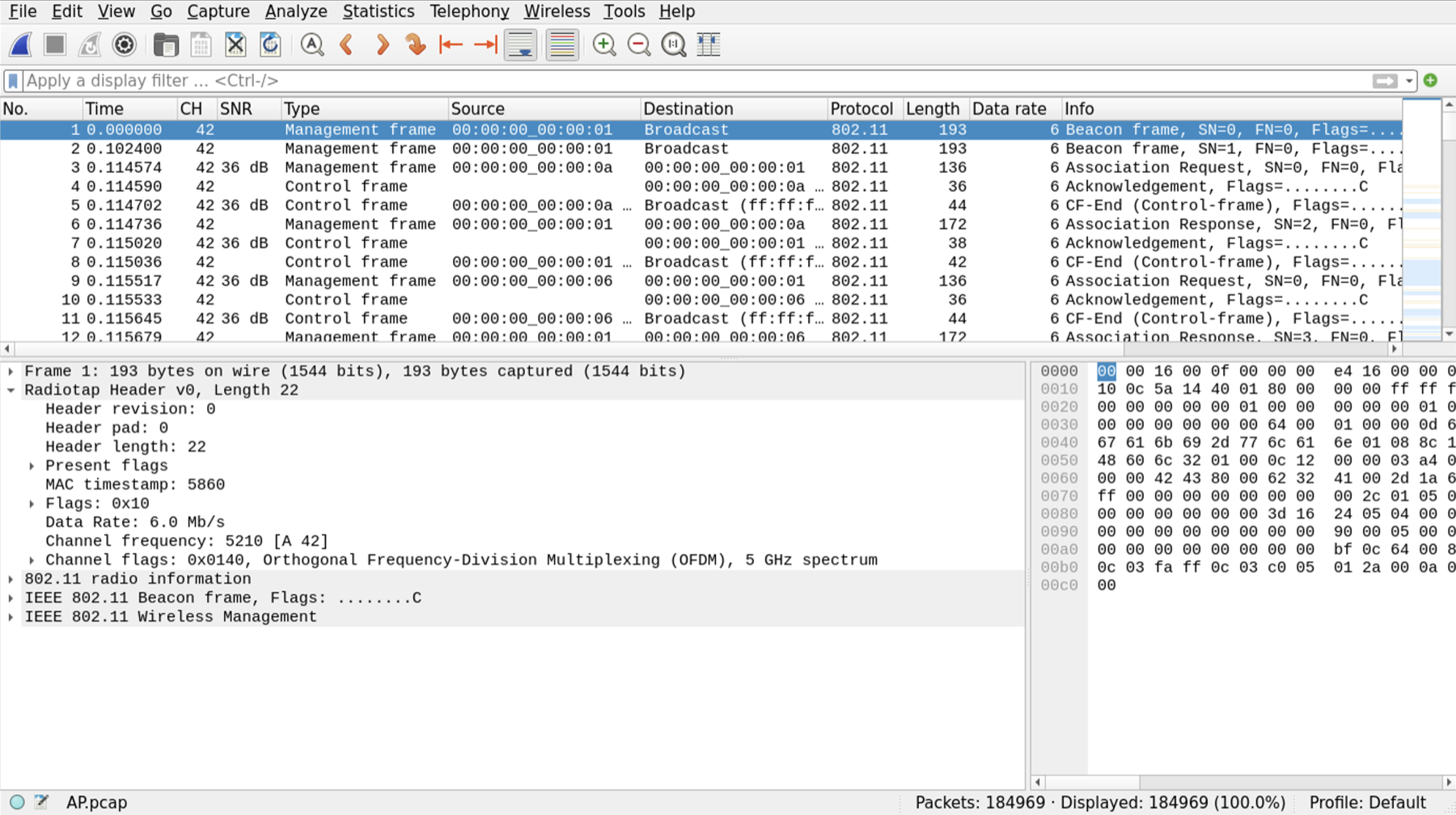
PCAP ファイルがあれば、AP が送信したフレームと、AP が受信できたフレームを確認できる。
ちなみに、scratch/wireless-pcap.cc で、
の行をコメントアウトしたり、
に変更したりすると、PCAP ファイルは下のように、Radiotap Header と 802.11 radio information がなくなって、Wi-Fi フレームっぽくなくなる。

NetAnim
NetAnim を使えばシミュレーション自体を可視化できる。Ubuntu で実行すれば、Wi-Fi フレームも可視化できた。
下記の scratch/wireless-netanim.cc のハイライト部分が scratch/wireless-simple.cc に追加したコード。
scratch/wireless-netanim.cc
#include "ns3/applications-module.h"
#include "ns3/core-module.h"
#include "ns3/csma-module.h"
#include "ns3/internet-module.h"
#include "ns3/mobility-module.h"
#include "ns3/network-module.h"
#include "ns3/ssid.h"
#include "ns3/yans-wifi-helper.h"
#include <string>
#include <sstream>
#include "ns3/animation-interface.h"

using namespace ns3;

NS_LOG_COMPONENT_DEFINE("WirelessNetAnim");

int
main(int argc, char* argv[])
{
    ////
    // Nodes, Devices, Topologies
    ////

    uint32_t nWifi = 10;
    double center = 10.0;
    double radius = 10.0;
    std::string DataRate = "60Mbps";

    NodeContainer allNodes;
    NodeContainer wifiStaNodes;
    wifiStaNodes.Create(nWifi);
    allNodes.Add(wifiStaNodes);
    NodeContainer wifiApNode;
    wifiApNode.Create(1);
    allNodes.Add(wifiApNode);

    YansWifiChannelHelper channel = YansWifiChannelHelper::Default();
    YansWifiPhyHelper phy;
    phy.SetChannel(channel.Create());
    phy.Set("Antennas", UintegerValue(2));
    phy.Set("MaxSupportedTxSpatialStreams", UintegerValue(2));
    phy.Set("MaxSupportedRxSpatialStreams", UintegerValue(2));
    phy.Set("ChannelSettings", StringValue("{42, 80, BAND_5GHZ, 0}"));

    WifiHelper wifi;
    wifi.SetStandard(WIFI_STANDARD_80211ac);
    wifi.SetRemoteStationManager("ns3::ConstantRateWifiManager",
                                 "DataMode", StringValue("VhtMcs9"),
                                 "ControlMode", StringValue("VhtMcs9")
    );
    wifi.ConfigHtOptions("ShortGuardIntervalSupported", BooleanValue(true));
    WifiMacHelper mac;
    Ssid ssid = Ssid("ishigaki-wlan");

    mac.SetType("ns3::ApWifiMac", "Ssid", SsidValue(ssid));
    NetDeviceContainer apDevices;
    apDevices = wifi.Install(phy, mac, wifiApNode);

    mac.SetType("ns3::StaWifiMac", "Ssid", SsidValue(ssid), "ActiveProbing", BooleanValue(false));
    NetDeviceContainer staDevices;
    staDevices = wifi.Install(phy, mac, wifiStaNodes);

    ////
    // Mobility
    ////

    MobilityHelper mobility;
    Ptr<ListPositionAllocator> positionAlloc = CreateObject<ListPositionAllocator>();
    mobility.SetMobilityModel("ns3::ConstantPositionMobilityModel");
    positionAlloc->Add(Vector(center, center, 0.0));
    // Set position for STAs
    for (uint32_t i = 0; i < nWifi; ++i)
    {
        double angle = 2 * M_PI * i / nWifi;
        double x = radius * std::cos(angle);
        double y = radius * std::sin(angle);
        positionAlloc->Add(Vector(center+x, center+y, 0.0));
    }
    mobility.SetPositionAllocator(positionAlloc);
    mobility.Install(wifiApNode);
    mobility.Install(wifiStaNodes);

    ////
    // Install internet stack
    ////

    InternetStackHelper stack;
    stack.Install(allNodes);

    ////
    // Install Ipv4 addresses
    ////

    Ipv4AddressHelper address;

    //// AP, STAs IP
    address.SetBase("192.168.0.0", "255.255.255.0");
    Ipv4InterfaceContainer apInterface;
    apInterface = address.Assign(apDevices);
    Ipv4InterfaceContainer staInterfaces;
    staInterfaces = address.Assign(staDevices);

    ////
    // Install applications
    ////

    uint16_t port = 9;
    Address sinkAddress(InetSocketAddress(apInterface.GetAddress(0), port));
    PacketSinkHelper sinkHelper("ns3::UdpSocketFactory", sinkAddress);
    ApplicationContainer sinkApps = sinkHelper.Install(wifiApNode.Get(0));
    sinkApps.Start(Seconds(1.0));
    sinkApps.Stop(Seconds(12.0));
    OnOffHelper onOff("ns3::UdpSocketFactory", sinkAddress);
    onOff.SetAttribute("DataRate", StringValue(DataRate));
    onOff.SetAttribute("PacketSize", UintegerValue(1472));
    onOff.SetAttribute("OnTime", StringValue("ns3::ConstantRandomVariable[Constant=1.0]"));
    onOff.SetAttribute("OffTime", StringValue("ns3::ConstantRandomVariable[Constant=0.0]"));
    onOff.SetAttribute("StartTime", TimeValue(Seconds(2.0)));
    onOff.SetAttribute("StopTime", TimeValue(Seconds(12.0)));
    ApplicationContainer clientApps = onOff.Install(wifiStaNodes);

    Simulator::Stop(Seconds(12));

    ////
    // Animation
    ////

    AnimationInterface anim("wireless-netanim.xml");
    anim.EnablePacketMetadata();

    Simulator::Run();
    Simulator::Destroy();
    return 0;
}
ns3/animation-interface.hをインクルード- ちなみに、ヘッダファイルとして
ns3/netanim-module.hを include しても、中身はanimation-interface.hだけ
- ちなみに、ヘッダファイルとして
- ログコンポーネント名を
WirelessNetAnimに変更(絶対に必要ってわけではないけど変えておく) Simulator::Run()の前に、AnimationInterfaceで NetAnim 用の XML ファイルwireless-netanim.xmlを出力するように設定- API Reference:
AnimationInterface
- API Reference:
EnablePacketMetadata()で、パケットのメタデータも XML ファイルに書き込む- API Reference:
EnablePacketMetadata()
- API Reference:
scratch/wireless-netanim.cc を実行すると、XML ファイルが出力される。
ishigaki@ishigaki-NS3:~/ns-allinone-3.44/ns-3.44$ ./ns3 run scratch/wireless-netanim.cc
Max Packets per trace file exceeded

ishigaki@ishigaki-NS3:~/ns-allinone-3.44/ns-3.44$ ls -l wireless-netanim.xml
-rw-rw-r-- 1 ishigaki ishigaki 10993688  9月 29 11:44 wireless-netanim.xml
※ Max Packets per trace file exceeded は、XML ファイルに書き込んだパケット数がデフォルトの上限(100,000)に達したので、そこで書き込みを止めたというメッセージ。
上限は SetMaxPktsPerTraceFile() で変えられるけど、XML ファイルが大きくなりすぎると NetAnim で開けなくなる(試しに上限を 6,000,000 にしたら、10 秒分すべて書き込めたけど、XML ファイルが 581 MiB になって開けなかった)。
この XML ファイルを NetAnim で開くと、シミュレーションの結果を可視化できる。
-
NetAnim 起動
-
NetAnim 起動後、
wireless-netanim.xmlを開く -
再生ボタン(▶)を押すと、シミュレーションがアニメーションで再生される
NetAnim を使えば、各ノードの配置を確認できるようになる。 あと、動画として表現できるので、発表する時とかこのページに載せる時とか、視線を集められるかな・・・
デフォルトだと、AP も STA も区別なく赤丸🔴で示されていて、分かりづらい。
下記の scratch/wireless-netanim-pic.cc では、用意しておいた画像で各ノードを表現できる。
ハイライト部分が scratch/wireless-netanim.cc に追加したコード。
scratch/wireless-netanim-pic.cc
#include "ns3/applications-module.h"
#include "ns3/core-module.h"
#include "ns3/csma-module.h"
#include "ns3/internet-module.h"
#include "ns3/mobility-module.h"
#include "ns3/network-module.h"
#include "ns3/ssid.h"
#include "ns3/yans-wifi-helper.h"
#include <string>
#include <sstream>
#include "ns3/animation-interface.h"

using namespace ns3;

NS_LOG_COMPONENT_DEFINE("WirelessNetAnimPic");

int
main(int argc, char* argv[])
{
    ////
    // Nodes, Devices, Topologies
    ////

    uint32_t nWifi = 10;
    double center = 10.0;
    double radius = 10.0;
    std::string DataRate = "60Mbps";

    NodeContainer allNodes;
    NodeContainer wifiStaNodes;
    wifiStaNodes.Create(nWifi);
    allNodes.Add(wifiStaNodes);
    NodeContainer wifiApNode;
    wifiApNode.Create(1);
    allNodes.Add(wifiApNode);

    YansWifiChannelHelper channel = YansWifiChannelHelper::Default();
    YansWifiPhyHelper phy;
    phy.SetChannel(channel.Create());
    phy.Set("Antennas", UintegerValue(2));
    phy.Set("MaxSupportedTxSpatialStreams", UintegerValue(2));
    phy.Set("MaxSupportedRxSpatialStreams", UintegerValue(2));
    phy.Set("ChannelSettings", StringValue("{42, 80, BAND_5GHZ, 0}"));

    WifiHelper wifi;
    wifi.SetStandard(WIFI_STANDARD_80211ac);
    wifi.SetRemoteStationManager("ns3::ConstantRateWifiManager",
                                 "DataMode", StringValue("VhtMcs9"),
                                 "ControlMode", StringValue("VhtMcs9")
    );
    wifi.ConfigHtOptions("ShortGuardIntervalSupported", BooleanValue(true));
    WifiMacHelper mac;
    Ssid ssid = Ssid("ishigaki-wlan");

    mac.SetType("ns3::ApWifiMac", "Ssid", SsidValue(ssid));
    NetDeviceContainer apDevices;
    apDevices = wifi.Install(phy, mac, wifiApNode);

    mac.SetType("ns3::StaWifiMac", "Ssid", SsidValue(ssid), "ActiveProbing", BooleanValue(false));
    NetDeviceContainer staDevices;
    staDevices = wifi.Install(phy, mac, wifiStaNodes);

    ////
    // Mobility
    ////

    MobilityHelper mobility;
    Ptr<ListPositionAllocator> positionAlloc = CreateObject<ListPositionAllocator>();
    mobility.SetMobilityModel("ns3::ConstantPositionMobilityModel");
    positionAlloc->Add(Vector(center, center, 0.0));
    // Set position for STAs
    for (uint32_t i = 0; i < nWifi; ++i)
    {
        double angle = 2 * M_PI * i / nWifi;
        double x = radius * std::cos(angle);
        double y = radius * std::sin(angle);
        positionAlloc->Add(Vector(center+x, center+y, 0.0));
    }
    mobility.SetPositionAllocator(positionAlloc);
    mobility.Install(wifiApNode);
    mobility.Install(wifiStaNodes);

    ////
    // Install internet stack
    ////

    InternetStackHelper stack;
    stack.Install(allNodes);

    ////
    // Install Ipv4 addresses
    ////

    Ipv4AddressHelper address;

    //// AP, STAs IP
    address.SetBase("192.168.0.0", "255.255.255.0");
    Ipv4InterfaceContainer apInterface;
    apInterface = address.Assign(apDevices);
    Ipv4InterfaceContainer staInterfaces;
    staInterfaces = address.Assign(staDevices);

    ////
    // Install applications
    ////

    uint16_t port = 9;
    Address sinkAddress(InetSocketAddress(apInterface.GetAddress(0), port));
    PacketSinkHelper sinkHelper("ns3::UdpSocketFactory", sinkAddress);
    ApplicationContainer sinkApps = sinkHelper.Install(wifiApNode.Get(0));
    sinkApps.Start(Seconds(1.0));
    sinkApps.Stop(Seconds(12.0));
    OnOffHelper onOff("ns3::UdpSocketFactory", sinkAddress);
    onOff.SetAttribute("DataRate", StringValue(DataRate));
    onOff.SetAttribute("PacketSize", UintegerValue(1472));
    onOff.SetAttribute("OnTime", StringValue("ns3::ConstantRandomVariable[Constant=1.0]"));
    onOff.SetAttribute("OffTime", StringValue("ns3::ConstantRandomVariable[Constant=0.0]"));
    onOff.SetAttribute("StartTime", TimeValue(Seconds(2.0)));
    onOff.SetAttribute("StopTime", TimeValue(Seconds(12.0)));
    ApplicationContainer clientApps = onOff.Install(wifiStaNodes);

    Simulator::Stop(Seconds(12));

    ////
    // Animation
    ////

    AnimationInterface anim("wireless-netanim.xml");

    uint32_t apImageId = anim.AddResource("AP.png");
    uint32_t apNodeId = wifiApNode.Get(0)->GetId();
    anim.UpdateNodeDescription(apNodeId, "AP");
    anim.UpdateNodeImage(apNodeId, apImageId);
    anim.UpdateNodeSize(apNodeId, 1.0, 1.0);

    uint32_t staImageId = anim.AddResource("STA.png");
    for (uint32_t i = 0; i < wifiStaNodes.GetN(); ++i)
    {
        uint32_t nodeId = wifiStaNodes.Get(i)->GetId();
        std::ostringstream oss;
        oss << "STA-" << i;
        anim.UpdateNodeDescription(nodeId, oss.str());
        anim.UpdateNodeImage(nodeId, staImageId);
        anim.UpdateNodeSize(nodeId, 1.0, 1.0);
    }

    anim.EnablePacketMetadata();

    Simulator::Run();
    Simulator::Destroy();
    return 0;
}
- ログコンポーネント名を
WirelessNetAnimPicに変更(絶対に必要ってわけではないけど変えておく) AddResource()で、AP 用の画像AP.pngと STA 用の画像STA.pngを登録- API Reference:
AddResource() - 画像ファイルは、
./NetAnimコマンドを実行するディレクトリからの相対パスで指定する
- API Reference:
UpdateNodeDescription()で、各ノードに表示する名前をAP、STA-0〜STA-9に設定- API Reference:
UpdateNodeDescription()
- API Reference:
UpdateNodeImage()で、各ノードを登録した画像で表示- API Reference:
UpdateNodeImage()
- API Reference:
UpdateNodeSize()で、各ノードのサイズを設定(ここでは 1.0 × 1.0)- API Reference:
UpdateNodeSize() UpdateNodeSize()はやらないと、0 番(STA-0)の画像だけでかくなって、それ以降(STA-1〜STA-9)の画像は普通のサイズになるっていうことがあったので、サイズ変更する必要がなくても初期化する的な感じでやっておくのがいいかも
- API Reference:
scratch/wireless-netanim-pic.cc を実行したら、下図のように AP と STA の画像が表示される。
シミュレーションによる Frame Aggregation の検証
Frame Aggregation ってどれくらい Wi-Fi ネットワークのスループットに影響があるのか気になったのでシミュレーションしてみる。 シミュレーションのシナリオは上にある図と同じ状況にしておく。
-
1 つの AP を中心として 10m 離れた円周上に、36°ごとに動かない STA が 10 個並んでる状況
-
それぞれの STA が 802.11ac/80MHz/2SS で接続して、60Mbps で AP に UDP データを 10 秒間送信し続ける
A-MSDU のシミュレーション
A-MSDU を使う場合と使わない場合でどれだけスループットに影響が出るか、比較してみる。
A-MSDU 以外はすべて同じ条件とするので、単純に A-MSDU だけの影響が出てくるはず。
作成したシミュレーションコード: scratch/A-MSDU_simulation.cc
scratch/A-MSDU_simulation.cc
/* -*- Mode:C++; c-file-style:"gnu"; indent-tabs-mode:nil; -*- */
/*
 * A-MSDU_simulation.cc
 *
 * This ns-3 simulation demonstrates the effect of enabling or disabling A-MSDU aggregation
 * in an IEEE 802.11ac Wi-Fi network using the VHT (Very High Throughput) mode.
 *
 * Simulation Scenario:
 * - One AP and multiple STA nodes (default 10 STAs)
 * - All STAs send UDP traffic to the AP using OnOff applications
 * - Nodes are arranged in a circle around the AP
 * - FlowMonitor is used to collect statistics
 * - NetAnim output is generated for visualization
 * - The simulation can be configured to disable A-MSDU via command line
 *
 * Key Features:
 * - Supports IEEE 802.11ac with VHT MCS9 (Short GI enabled)
 * - Allows toggling of A-MSDU using "--amsduDisable=true"
 * - Generates PCAP, FlowMonitor XML, and NetAnim XML outputs
 *
 * Command Line Usage:
 *   ./ns3 run "scratch/A-MSDU_simulation.cc"
 *   ./ns3 run "scratch/A-MSDU_simulation.cc --amsduDisable=true"
 *
 * Output Files:
 *   A-MSDU_AP.pcap or A-MSDU_AP_amsduDisable.pcap
 *   A-MSDU_Flow.xml or A-MSDU_Flow_amsduDisable.xml
 *   A-MSDU_NetAnim.xml or A-MSDU_NetAnim_amsduDisable.xml
 *
 * Author: TASUKU ISHIGAKI
 * Date: August 2025
 */

#include "ns3/applications-module.h"
#include "ns3/core-module.h"
#include "ns3/csma-module.h"
#include "ns3/internet-module.h"
#include "ns3/mobility-module.h"
#include "ns3/network-module.h"
#include "ns3/ssid.h"
#include "ns3/yans-wifi-helper.h"
#include <string>
#include <sstream>
#include "ns3/flow-monitor-module.h"
#include "ns3/netanim-module.h"

using namespace ns3;

NS_LOG_COMPONENT_DEFINE("A-MSDU_simulation");

int
main(int argc, char* argv[])
{
    ////
    // Nodes, Devices, Topologies
    ////

    uint32_t nWifi = 10;
    double center = 10.0;
    double radius = 10.0;
    uint32_t MaxAmpduSize = 1048575; // Fixed Parameter
    uint32_t MaxAmsduSize = 7935;
    std::string DataRate = "60Mbps";
    std::string pcapFile = "A-MSDU_AP.pcap";
    std::string flowmonFile = "A-MSDU_Flow.xml";
    std::string netanimFile = "A-MSDU_NetAnim.xml";
    bool amsduDisable{false};

    CommandLine cmd(__FILE__);
    cmd.AddValue("amsduDisable", "Run this simulation without A-MSDU", amsduDisable);
    cmd.Parse(argc, argv);

    if (amsduDisable)
    {
        MaxAmsduSize = 0;
        pcapFile = "A-MSDU_AP_amsduDisable.pcap";
        flowmonFile = "A-MSDU_Flow_amsduDisable.xml";
        netanimFile = "A-MSDU_NetAnim_amsduDisable.xml";
    }

    NodeContainer allNodes;
    NodeContainer wifiStaNodes;
    wifiStaNodes.Create(nWifi);
    allNodes.Add(wifiStaNodes);
    NodeContainer wifiApNode;
    wifiApNode.Create(1);
    allNodes.Add(wifiApNode);

    YansWifiChannelHelper channel = YansWifiChannelHelper::Default();
    YansWifiPhyHelper phy;
    phy.SetChannel(channel.Create());
    phy.Set("Antennas", UintegerValue(2));
    phy.Set("MaxSupportedTxSpatialStreams", UintegerValue(2));
    phy.Set("MaxSupportedRxSpatialStreams", UintegerValue(2));
    phy.Set("ChannelSettings", StringValue("{42, 80, BAND_5GHZ, 0}"));

    WifiHelper wifi;
    wifi.SetStandard(WIFI_STANDARD_80211ac);
    wifi.SetRemoteStationManager("ns3::ConstantRateWifiManager",
                                 "DataMode", StringValue("VhtMcs9"),
                                 "ControlMode", StringValue("VhtMcs9")
    );
    wifi.ConfigHtOptions("ShortGuardIntervalSupported", BooleanValue(true));
    WifiMacHelper mac;
    Ssid ssid = Ssid("ishigaki-wlan");

    mac.SetType("ns3::ApWifiMac",
                "Ssid", SsidValue(ssid),
                "BE_MaxAmpduSize", UintegerValue(MaxAmpduSize),
                "BE_MaxAmsduSize", UintegerValue(MaxAmsduSize));
    NetDeviceContainer apDevices;
    apDevices = wifi.Install(phy, mac, wifiApNode);
    phy.SetPcapDataLinkType(YansWifiPhyHelper::DLT_IEEE802_11_RADIO);
    phy.EnablePcap(pcapFile, apDevices.Get(0), false, true);

    mac.SetType("ns3::StaWifiMac",
                "Ssid", SsidValue(ssid),
                "ActiveProbing", BooleanValue(false),
                "BE_MaxAmpduSize", UintegerValue(MaxAmpduSize),
                "BE_MaxAmsduSize", UintegerValue(MaxAmsduSize));
    NetDeviceContainer staDevices;
    staDevices = wifi.Install(phy, mac, wifiStaNodes);

    ////
    // Mobility
    ////

    MobilityHelper mobility;
    Ptr<ListPositionAllocator> positionAlloc = CreateObject<ListPositionAllocator>();
    mobility.SetMobilityModel("ns3::ConstantPositionMobilityModel");
    positionAlloc->Add(Vector(center, center, 0.0));
    // Set position for STAs
    for (uint32_t i = 0; i < nWifi; ++i)
    {
        double angle = 2 * M_PI * i / nWifi;
        double x = radius * std::cos(angle);
        double y = radius * std::sin(angle);
        positionAlloc->Add(Vector(center+x, center+y, 0.0));
    }
    mobility.SetPositionAllocator(positionAlloc);
    mobility.Install(wifiApNode);
    mobility.Install(wifiStaNodes);

    ////
    // Install internet stack
    ////

    InternetStackHelper stack;
    stack.Install(allNodes);

    ////
    // Install Ipv4 addresses
    ////

    Ipv4AddressHelper address;

    //// AP, STAs IP
    address.SetBase("192.168.0.0", "255.255.255.0");
    Ipv4InterfaceContainer apInterface;
    apInterface = address.Assign(apDevices);
    Ipv4InterfaceContainer staInterfaces;
    staInterfaces = address.Assign(staDevices);

    ////
    // Install applications
    ////

    uint16_t port = 9;
    Address sinkAddress(InetSocketAddress(apInterface.GetAddress(0), port));
    PacketSinkHelper sinkHelper("ns3::UdpSocketFactory", sinkAddress);
    ApplicationContainer sinkApps = sinkHelper.Install(wifiApNode.Get(0));
    sinkApps.Start(Seconds(1.0));
    sinkApps.Stop(Seconds(12.0));
    OnOffHelper onOff("ns3::UdpSocketFactory", sinkAddress);
    onOff.SetAttribute("DataRate", StringValue(DataRate));
    onOff.SetAttribute("PacketSize", UintegerValue(1472));
    onOff.SetAttribute("Tos", UintegerValue(0x00)); // AC_BE
    onOff.SetAttribute("OnTime", StringValue("ns3::ConstantRandomVariable[Constant=1.0]"));
    onOff.SetAttribute("OffTime", StringValue("ns3::ConstantRandomVariable[Constant=0.0]"));
    onOff.SetAttribute("StartTime", TimeValue(Seconds(2.0)));
    onOff.SetAttribute("StopTime", TimeValue(Seconds(12.0)));
    ApplicationContainer clientApps = onOff.Install(wifiStaNodes);

    Simulator::Stop(Seconds(12));

    ////
    // Flowmonitor
    ////

    Ptr<FlowMonitor> flowmon;
    FlowMonitorHelper flowmonHelper;
    flowmon = flowmonHelper.InstallAll();

    ////
    // Animation
    ////

    AnimationInterface anim(netanimFile);

    uint32_t apImageId = anim.AddResource("AP.png");
    uint32_t apNodeId = wifiApNode.Get(0)->GetId();
    anim.UpdateNodeDescription(apNodeId, "AP");
    anim.UpdateNodeImage(apNodeId, apImageId);
    anim.UpdateNodeSize(apNodeId, 1.0, 1.0);

    uint32_t staImageId = anim.AddResource("STA.png");
    for (uint32_t i = 0; i < wifiStaNodes.GetN(); ++i)
    {
        uint32_t nodeId = wifiStaNodes.Get(i)->GetId();
        std::ostringstream oss;
        oss << "STA-" << i;
        anim.UpdateNodeDescription(nodeId, oss.str());
        anim.UpdateNodeImage(nodeId, staImageId);
        anim.UpdateNodeSize(nodeId, 1.0, 1.0);
    }

    anim.EnablePacketMetadata();

    Simulator::Run();
    flowmon->SerializeToXmlFile(flowmonFile, true, true);
    Simulator::Destroy();
    return 0;
}
- UDP パケットはすべて AC_BE に設定(
onOff.SetAttribute("Tos", UintegerValue(0x00));)- ns-3 の Wi-Fi では TOS の上位 3 ビットが UP になって、UP 0 は AC_BE に割り当てられる
- 参考: Selection of the Access Category (AC)
- どちらの環境でも A-MPDU は使えるようにしておく(
"BE_MaxAmpduSize", UintegerValue(MaxAmpduSize)、MaxAmpduSize = 1048575)- 1048575 は VHT の A-MPDU の最大長(デフォルトは 65535)
- A-MSDU の最大長は 7935(
uint32_t MaxAmsduSize = 7935;)、--amsduDisable=trueのときは 0(A-MSDU を使わない)- Aruba のアクセスポイントの実機で 7935 に設定されていたので、それに合わせてる(VHT なら 11398 まで設定できる)
-
BE_MaxAmsduSizeの値を0にすれば A-MSDU を無効にできるValue 0 means A-MSDU aggregation is disabled for that AC.
https://www.nsnam.org/docs/release/3.44/doxygen/d3/d57/classns3_1_1_wifi_mac.html より
scratch/A-MSDU_simulation.cc を実行すると、シミュレーション結果(PCAP, FlowMonitor, NetAnim)が出力されるので、出力ファイルを比較することで違いを見つける。
A-MSDU を有効にしたシミュレーション
ishigaki@ishigaki-NS3:~/ns-allinone-3.44/ns-3.44$ ./ns3 run "scratch/A-MSDU_simulation.cc"

ishigaki@ishigaki-NS3:~/ns-allinone-3.44/ns-3.44$ ls -l A-MSDU_AP.pcap
-rw-rw-r-- 1 ishigaki ishigaki 708453296  9月 29 14:53 A-MSDU_AP.pcap

ishigaki@ishigaki-NS3:~/ns-allinone-3.44/ns-3.44$ ls -l A-MSDU_Flow.xml
-rw-rw-r-- 1 ishigaki ishigaki 937331  9月 29 14:53 A-MSDU_Flow.xml

ishigaki@ishigaki-NS3:~/ns-allinone-3.44/ns-3.44$ ls -l A-MSDU_NetAnim.xml
-rw-rw-r-- 1 ishigaki ishigaki 27693845  9月 29 14:52 A-MSDU_NetAnim.xml
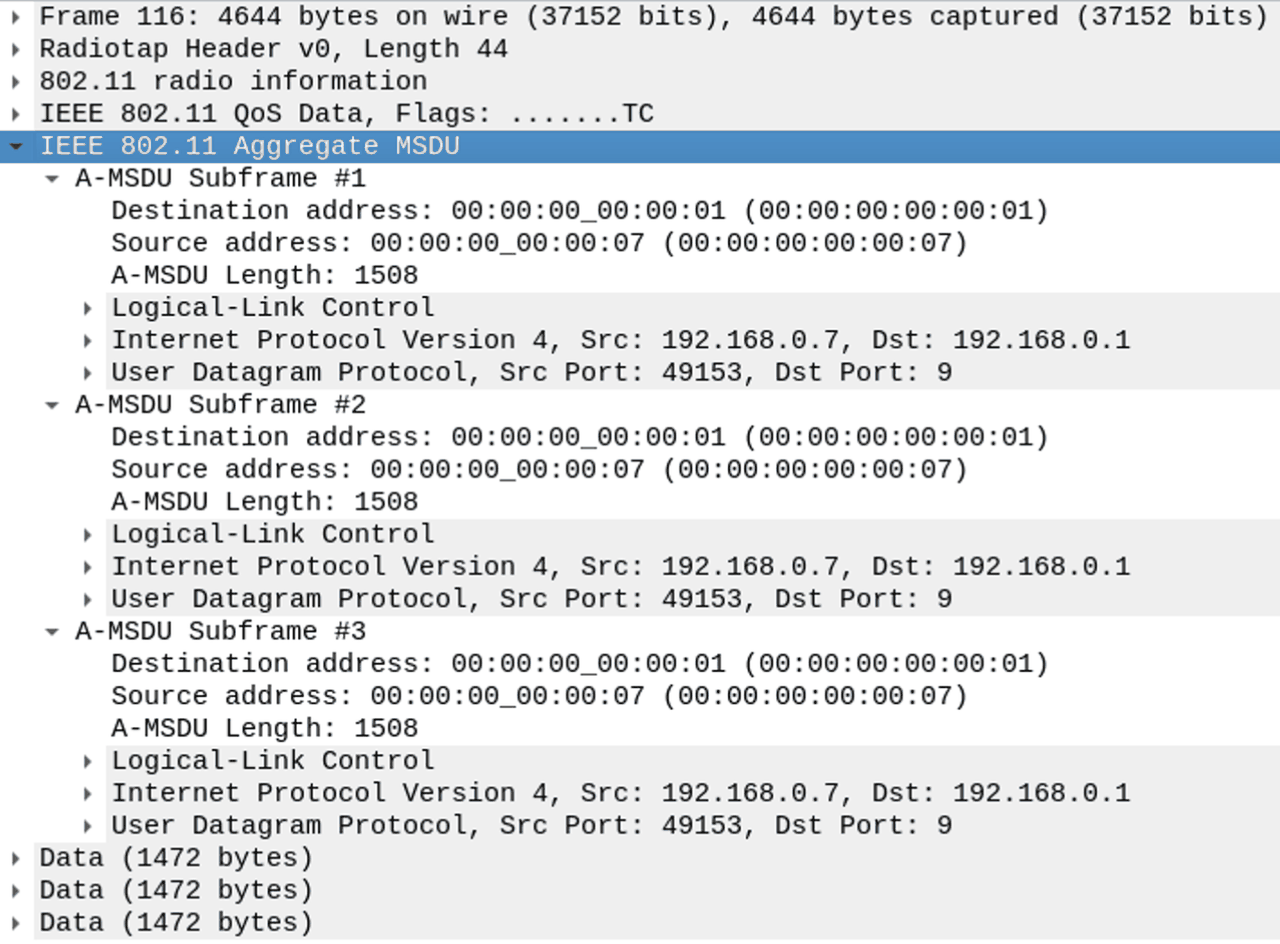
PCAP ファイルを Wireshark で開くと、A-MSDU サブフレームが観察できるので、A-MSDU は使えてることがわかる。
FlowMonitor でスループットを見てみる: A-MPDU 有効 と同じ結果
平均スループット(10 フローの RX bitrate の平均)は 56.1 Mbps。
flowmon-parse-results.py の実行結果(A-MSDU 有効)
ishigaki@ishigaki-NS3:~/ns-allinone-3.44/ns-3.44$ python3 flowmon-parse-results.py A-MSDU_Flow.xml
Reading XML file  . done.
FlowID: 1 (UDP 192.168.0.2/49153 --> 192.168.0.1/9)
    TX bitrate: 61142.42 kbit/s
    RX bitrate: 53402.83 kbit/s
    Mean Delay: 318.23 ms
    Packet Loss Ratio: 0.38 %
FlowID: 2 (UDP 192.168.0.3/49153 --> 192.168.0.1/9)
    TX bitrate: 61142.42 kbit/s
    RX bitrate: 58907.01 kbit/s
    Mean Delay: 203.31 ms
    Packet Loss Ratio: 0.07 %
FlowID: 3 (UDP 192.168.0.4/49153 --> 192.168.0.1/9)
    TX bitrate: 61142.42 kbit/s
    RX bitrate: 58314.17 kbit/s
    Mean Delay: 299.00 ms
    Packet Loss Ratio: 0.28 %
FlowID: 4 (UDP 192.168.0.5/49153 --> 192.168.0.1/9)
    TX bitrate: 61142.42 kbit/s
    RX bitrate: 59014.38 kbit/s
    Mean Delay: 426.02 ms
    Packet Loss Ratio: 1.55 %
FlowID: 5 (UDP 192.168.0.6/49153 --> 192.168.0.1/9)
    TX bitrate: 61142.42 kbit/s
    RX bitrate: 53792.42 kbit/s
    Mean Delay: 287.62 ms
    Packet Loss Ratio: 0.49 %
FlowID: 6 (UDP 192.168.0.7/49153 --> 192.168.0.1/9)
    TX bitrate: 61142.42 kbit/s
    RX bitrate: 53024.70 kbit/s
    Mean Delay: 587.06 ms
    Packet Loss Ratio: 1.40 %
FlowID: 7 (UDP 192.168.0.8/49153 --> 192.168.0.1/9)
    TX bitrate: 61142.42 kbit/s
    RX bitrate: 60342.05 kbit/s
    Mean Delay: 233.29 ms
    Packet Loss Ratio: 0.27 %
FlowID: 8 (UDP 192.168.0.9/49153 --> 192.168.0.1/9)
    TX bitrate: 61142.42 kbit/s
    RX bitrate: 54480.35 kbit/s
    Mean Delay: 356.23 ms
    Packet Loss Ratio: 0.17 %
FlowID: 9 (UDP 192.168.0.10/49153 --> 192.168.0.1/9)
    TX bitrate: 61142.42 kbit/s
    RX bitrate: 54061.14 kbit/s
    Mean Delay: 785.39 ms
    Packet Loss Ratio: 3.43 %
FlowID: 10 (UDP 192.168.0.11/49153 --> 192.168.0.1/9)
    TX bitrate: 61142.42 kbit/s
    RX bitrate: 55809.12 kbit/s
    Mean Delay: 377.11 ms
    Packet Loss Ratio: 0.54 %
A-MSDU を無効にしたシミュレーション
ishigaki@ishigaki-NS3:~/ns-allinone-3.44/ns-3.44$ ./ns3 run "scratch/A-MSDU_simulation.cc --amsduDisable=true"

ishigaki@ishigaki-NS3:~/ns-allinone-3.44/ns-3.44$ ls -l A-MSDU_AP_amsduDisable.pcap
-rw-rw-r-- 1 ishigaki ishigaki 652588350  9月 29 15:00 A-MSDU_AP_amsduDisable.pcap

ishigaki@ishigaki-NS3:~/ns-allinone-3.44/ns-3.44$ ls -l A-MSDU_Flow_amsduDisable.xml
-rw-rw-r-- 1 ishigaki ishigaki 944325  9月 29 15:00 A-MSDU_Flow_amsduDisable.xml

ishigaki@ishigaki-NS3:~/ns-allinone-3.44/ns-3.44$ ls -l A-MSDU_NetAnim_amsduDisable.xml
-rw-rw-r-- 1 ishigaki ishigaki 11725225  9月 29 14:58 A-MSDU_NetAnim_amsduDisable.xml
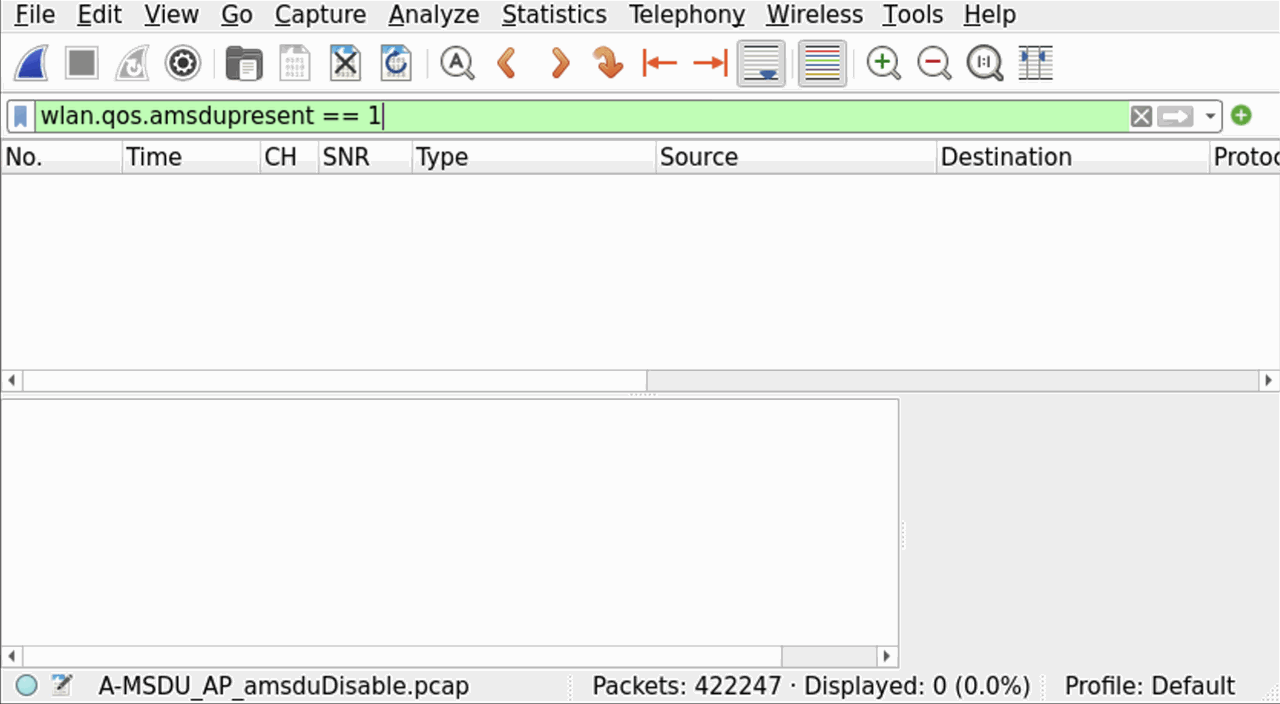
PCAP ファイルを Wireshark で開いて、wlan.qos.amsdupresent == 1 で絞り込むと 0 件なので、A-MSDU は使われていないことがわかる。
FlowMonitor でスループットを見てみる。
平均スループット(10 フローの RX bitrate の平均)は 49.1 Mbps。
flowmon-parse-results.py の実行結果(A-MSDU 無効)
ishigaki@ishigaki-NS3:~/ns-allinone-3.44/ns-3.44$ python3 flowmon-parse-results.py A-MSDU_Flow_amsduDisable.xml
Reading XML file  . done.
FlowID: 1 (UDP 192.168.0.2/49153 --> 192.168.0.1/9)
    TX bitrate: 61142.42 kbit/s
    RX bitrate: 40323.65 kbit/s
    Mean Delay: 1650.81 ms
    Packet Loss Ratio: 14.48 %
FlowID: 2 (UDP 192.168.0.3/49153 --> 192.168.0.1/9)
    TX bitrate: 61142.42 kbit/s
    RX bitrate: 48754.83 kbit/s
    Mean Delay: 930.81 ms
    Packet Loss Ratio: 5.32 %
FlowID: 3 (UDP 192.168.0.4/49153 --> 192.168.0.1/9)
    TX bitrate: 61142.42 kbit/s
    RX bitrate: 44704.88 kbit/s
    Mean Delay: 739.49 ms
    Packet Loss Ratio: 5.73 %
FlowID: 4 (UDP 192.168.0.5/49153 --> 192.168.0.1/9)
    TX bitrate: 61142.42 kbit/s
    RX bitrate: 46061.49 kbit/s
    Mean Delay: 1572.14 ms
    Packet Loss Ratio: 7.18 %
FlowID: 5 (UDP 192.168.0.6/49153 --> 192.168.0.1/9)
    TX bitrate: 61142.42 kbit/s
    RX bitrate: 51962.78 kbit/s
    Mean Delay: 801.46 ms
    Packet Loss Ratio: 4.92 %
FlowID: 6 (UDP 192.168.0.7/49153 --> 192.168.0.1/9)
    TX bitrate: 61142.42 kbit/s
    RX bitrate: 55892.61 kbit/s
    Mean Delay: 404.08 ms
    Packet Loss Ratio: 1.73 %
FlowID: 7 (UDP 192.168.0.8/49153 --> 192.168.0.1/9)
    TX bitrate: 61142.42 kbit/s
    RX bitrate: 48891.62 kbit/s
    Mean Delay: 589.37 ms
    Packet Loss Ratio: 3.79 %
FlowID: 8 (UDP 192.168.0.9/49153 --> 192.168.0.1/9)
    TX bitrate: 61142.42 kbit/s
    RX bitrate: 54176.02 kbit/s
    Mean Delay: 790.88 ms
    Packet Loss Ratio: 2.60 %
FlowID: 9 (UDP 192.168.0.10/49153 --> 192.168.0.1/9)
    TX bitrate: 61142.42 kbit/s
    RX bitrate: 51069.14 kbit/s
    Mean Delay: 531.26 ms
    Packet Loss Ratio: 3.97 %
FlowID: 10 (UDP 192.168.0.11/49153 --> 192.168.0.1/9)
    TX bitrate: 61142.42 kbit/s
    RX bitrate: 49589.71 kbit/s
    Mean Delay: 799.59 ms
    Packet Loss Ratio: 4.14 %
結果の考察
- A-MSDU を無効にすると、平均スループットは 56.1 Mbps → 49.1 Mbps に下がった(約 12%)
- 10 フローの合計でも 561.1 Mbps → 491.4 Mbps
- 平均遅延は 387.3 ms → 881.0 ms、パケットロス率の平均は 0.86 % → 5.39 % に悪化した
- STA ごとのばらつきも大きくなった(スループットの最小〜最大: 53.0〜60.3 Mbps → 40.3〜55.9 Mbps)
- PCAP を見ると、A-MSDU 有効では 1 つの QoS Data フレームの中に A-MSDU サブフレームが並んでいて、A-MSDU 無効では
wlan.qos.amsdupresent == 1で絞り込んでも 0 件だった - A-MSDU なら、複数の MSDU で MAC ヘッダー・FCS・A-MPDU のデリミターを共有できる
- ただ、ヘッダーの節約だけだと MSDU 1 つあたり十数バイト(1% 未満)なので、スループットの差(約 12%)はそれだけでは説明できない
- VHT の Block Ack で一度にやりとりできる MPDU の数は最大 64 なので、A-MSDU がないと 1 回の送信(A-MPDU)で運べるデータ量が少なくなっているのかも
A-MPDU のシミュレーション
A-MPDU を使う場合と使わない場合でどれだけスループットに影響が出るか、比較してみる。 A-MPDU 以外はすべて同じ条件とするので、単純に A-MPDU だけの影響が出てくるはず。
作成したシミュレーションコード: scratch/A-MPDU_simulation.cc
scratch/A-MPDU_simulation.cc
/* -*- Mode:C++; c-file-style:"gnu"; indent-tabs-mode:nil; -*- */
/*
 * A-MPDU_simulation.cc
 *
 * This ns-3 simulation demonstrates the effect of enabling or disabling A-MPDU aggregation
 * in an IEEE 802.11ac Wi-Fi network using the VHT (Very High Throughput) mode.
 *
 * Simulation Scenario:
 * - One AP and multiple STA nodes (default 10 STAs)
 * - All STAs send UDP traffic to the AP using OnOff applications
 * - Nodes are arranged in a circle around the AP
 * - FlowMonitor is used to collect statistics
 * - NetAnim output is generated for visualization
 * - The simulation can be configured to disable A-MPDU via command line
 *
 * Key Features:
 * - Supports IEEE 802.11ac with VHT MCS9 (Short GI enabled)
 * - Allows toggling of A-MPDU using "--ampduDisable=true"
 * - Generates PCAP, FlowMonitor XML, and NetAnim XML outputs
 *
 * Command Line Usage:
 *   ./ns3 run "scratch/A-MPDU_simulation.cc"
 *   ./ns3 run "scratch/A-MPDU_simulation.cc --ampduDisable=true"
 *
 * Output Files:
 *   A-MPDU_AP.pcap or A-MPDU_AP_ampduDisable.pcap
 *   A-MPDU_Flow.xml or A-MPDU_Flow_ampduDisable.xml
 *   A-MPDU_NetAnim.xml or A-MPDU_NetAnim_ampduDisable.xml
 *
 * Author: TASUKU ISHIGAKI
 * Date: August 2025
 */

#include "ns3/applications-module.h"
#include "ns3/core-module.h"
#include "ns3/csma-module.h"
#include "ns3/flow-monitor-module.h"
#include "ns3/internet-module.h"
#include "ns3/mobility-module.h"
#include "ns3/netanim-module.h"
#include "ns3/network-module.h"
#include "ns3/ssid.h"
#include "ns3/yans-wifi-helper.h"

#include <sstream>
#include <string>

using namespace ns3;

NS_LOG_COMPONENT_DEFINE("A-MPDU_simulation");

int
main(int argc, char* argv[])
{
    ////
    // Nodes, Devices, Topologies
    ////

    uint32_t nWifi = 10;
    double center = 10.0;
    double radius = 10.0;
    uint32_t MaxAmsduSize = 7935; // Fixed Parameter
    uint32_t MaxAmpduSize = 1048575;
    std::string DataRate = "60Mbps";
    std::string pcapFile = "A-MPDU_AP.pcap";
    std::string flowmonFile = "A-MPDU_Flow.xml";
    std::string netanimFile = "A-MPDU_NetAnim.xml";
    bool ampduDisable{false};

    CommandLine cmd(__FILE__);
    cmd.AddValue("ampduDisable", "Run this simulation without A-MPDU", ampduDisable);
    cmd.Parse(argc, argv);

    if (ampduDisable)
    {
        MaxAmpduSize = 0;
        pcapFile = "A-MPDU_AP_ampduDisable.pcap";
        flowmonFile = "A-MPDU_Flow_ampduDisable.xml";
        netanimFile = "A-MPDU_NetAnim_ampduDisable.xml";
    }

    NodeContainer allNodes;
    NodeContainer wifiStaNodes;
    wifiStaNodes.Create(nWifi);
    allNodes.Add(wifiStaNodes);
    NodeContainer wifiApNode;
    wifiApNode.Create(1);
    allNodes.Add(wifiApNode);

    YansWifiChannelHelper channel = YansWifiChannelHelper::Default();
    YansWifiPhyHelper phy;
    phy.SetChannel(channel.Create());
    phy.Set("Antennas", UintegerValue(2));
    phy.Set("MaxSupportedTxSpatialStreams", UintegerValue(2));
    phy.Set("MaxSupportedRxSpatialStreams", UintegerValue(2));
    phy.Set("ChannelSettings", StringValue("{42, 80, BAND_5GHZ, 0}"));

    WifiHelper wifi;
    wifi.SetStandard(WIFI_STANDARD_80211ac);
    wifi.SetRemoteStationManager("ns3::ConstantRateWifiManager",
                                 "DataMode", StringValue("VhtMcs9"),
                                 "ControlMode", StringValue("VhtMcs9"));
    wifi.ConfigHtOptions("ShortGuardIntervalSupported", BooleanValue(true));
    WifiMacHelper mac;
    Ssid ssid = Ssid("ishigaki-wlan");

    mac.SetType("ns3::ApWifiMac",
                "Ssid", SsidValue(ssid),
                "BE_MaxAmsduSize", UintegerValue(MaxAmsduSize),
                "BE_MaxAmpduSize", UintegerValue(MaxAmpduSize));
    NetDeviceContainer apDevices;
    apDevices = wifi.Install(phy, mac, wifiApNode);
    phy.SetPcapDataLinkType(YansWifiPhyHelper::DLT_IEEE802_11_RADIO);
    phy.EnablePcap(pcapFile, apDevices.Get(0), false, true);

    mac.SetType("ns3::StaWifiMac",
                "Ssid", SsidValue(ssid),
                "ActiveProbing", BooleanValue(false),
                "BE_MaxAmsduSize", UintegerValue(MaxAmsduSize),
                "BE_MaxAmpduSize", UintegerValue(MaxAmpduSize));
    NetDeviceContainer staDevices;
    staDevices = wifi.Install(phy, mac, wifiStaNodes);

    ////
    // Mobility
    ////

    MobilityHelper mobility;
    Ptr<ListPositionAllocator> positionAlloc = CreateObject<ListPositionAllocator>();
    mobility.SetMobilityModel("ns3::ConstantPositionMobilityModel");
    positionAlloc->Add(Vector(center, center, 0.0));
    // Set position for STAs
    for (uint32_t i = 0; i < nWifi; ++i)
    {
        double angle = 2 * M_PI * i / nWifi;
        double x = radius * std::cos(angle);
        double y = radius * std::sin(angle);
        positionAlloc->Add(Vector(center + x, center + y, 0.0));
    }
    mobility.SetPositionAllocator(positionAlloc);
    mobility.Install(wifiApNode);
    mobility.Install(wifiStaNodes);

    ////
    // Install internet stack
    ////

    InternetStackHelper stack;
    stack.Install(allNodes);

    ////
    // Install Ipv4 addresses
    ////

    Ipv4AddressHelper address;

    //// AP, STAs IP
    address.SetBase("192.168.0.0", "255.255.255.0");
    Ipv4InterfaceContainer apInterface;
    apInterface = address.Assign(apDevices);
    Ipv4InterfaceContainer staInterfaces;
    staInterfaces = address.Assign(staDevices);

    ////
    // Install applications
    ////

    uint16_t port = 9;
    Address sinkAddress(InetSocketAddress(apInterface.GetAddress(0), port));
    PacketSinkHelper sinkHelper("ns3::UdpSocketFactory", sinkAddress);
    ApplicationContainer sinkApps = sinkHelper.Install(wifiApNode.Get(0));
    sinkApps.Start(Seconds(1.0));
    sinkApps.Stop(Seconds(12.0));
    OnOffHelper onOff("ns3::UdpSocketFactory", sinkAddress);
    onOff.SetAttribute("DataRate", StringValue(DataRate));
    onOff.SetAttribute("PacketSize", UintegerValue(1472));
    onOff.SetAttribute("Tos", UintegerValue(0x00)); // AC_BE
    onOff.SetAttribute("OnTime", StringValue("ns3::ConstantRandomVariable[Constant=1.0]"));
    onOff.SetAttribute("OffTime", StringValue("ns3::ConstantRandomVariable[Constant=0.0]"));
    onOff.SetAttribute("StartTime", TimeValue(Seconds(2.0)));
    onOff.SetAttribute("StopTime", TimeValue(Seconds(12.0)));
    ApplicationContainer clientApps = onOff.Install(wifiStaNodes);

    Simulator::Stop(Seconds(12));

    ////
    // Flowmonitor
    ////

    Ptr<FlowMonitor> flowmon;
    FlowMonitorHelper flowmonHelper;
    flowmon = flowmonHelper.InstallAll();

    ////
    // Animation
    ////

    AnimationInterface anim(netanimFile);

    uint32_t apImageId = anim.AddResource("AP.png");
    uint32_t apNodeId = wifiApNode.Get(0)->GetId();
    anim.UpdateNodeDescription(apNodeId, "AP");
    anim.UpdateNodeImage(apNodeId, apImageId);
    anim.UpdateNodeSize(apNodeId, 1.0, 1.0);

    uint32_t staImageId = anim.AddResource("STA.png");
    for (uint32_t i = 0; i < wifiStaNodes.GetN(); ++i)
    {
        uint32_t nodeId = wifiStaNodes.Get(i)->GetId();
        std::ostringstream oss;
        oss << "STA-" << i;
        anim.UpdateNodeDescription(nodeId, oss.str());
        anim.UpdateNodeImage(nodeId, staImageId);
        anim.UpdateNodeSize(nodeId, 1.0, 1.0);
    }

    anim.EnablePacketMetadata();

    Simulator::Run();
    flowmon->SerializeToXmlFile(flowmonFile, true, true);
    Simulator::Destroy();
    return 0;
}
- UDP パケットはすべて AC_BE に設定(
onOff.SetAttribute("Tos", UintegerValue(0x00));)- ns-3 の Wi-Fi では TOS の上位 3 ビットが UP になって、UP 0 は AC_BE に割り当てられる
- 参考: Selection of the Access Category (AC)
- どちらの環境でも A-MSDU は使えるようにしておく(
"BE_MaxAmsduSize", UintegerValue(MaxAmsduSize)、MaxAmsduSize = 7935)- A-MSDU のシミュレーションと同じく、Aruba のアクセスポイントの実機に合わせて 7935
- A-MPDU の最大長は 1048575(
uint32_t MaxAmpduSize = 1048575;)、--ampduDisable=trueのときは 0(A-MPDU を使わない)- 1048575 は VHT の A-MPDU の最大長(デフォルトは 65535)
-
BE_MaxAmpduSizeの値を0にすれば A-MPDU を無効にできるValue 0 means A-MPDU aggregation is disabled for that AC.
https://www.nsnam.org/docs/release/3.44/doxygen/d3/d57/classns3_1_1_wifi_mac.html より
このシミュレーションで送信する UDP パケットはすべて AC_BE で、AC_BE の TXOP limit はデフォルトの 0 のまま変更していないので、1 回チャネルを獲得しても続けて送れるのはフレーム交換 1 回分だけ(TXOP で連続して送ることはしない)、という前提になっている。(= BlockAck フレームが返ってくるのは、A-MPDU に対してのみ。TXOP の間に複数のフレームが送信されたら、BlockAck フレームが返ってくることもあるけど、このシミュレーションでは複数のフレームは送信できない)
TXOP 以前にそもそも QoS に対応しているかっていうのは、User Documentation に記載があって、802.11ac(VHT)を使うようにしたら勝手に QoS 使うようになる。
when selecting 802.11ac as the desired wifi standard, 802.11e/WMM-style QoS, 802.11n-style High Throughput (HT) and 802.11ac-style Very High Throughput (VHT) support gets enabled.
scratch/A-MPDU_simulation.cc を実行すると、シミュレーション結果(PCAP, FlowMonitor, NetAnim)が出力されるので、出力ファイルを比較することで違いを見つける。
A-MPDU を有効にしたシミュレーション
ishigaki@ishigaki-NS3:~/ns-allinone-3.44/ns-3.44$ ./ns3 run "scratch/A-MPDU_simulation.cc"

ishigaki@ishigaki-NS3:~/ns-allinone-3.44/ns-3.44$ ls -l A-MPDU_AP.pcap
-rw-rw-r-- 1 ishigaki ishigaki 708453296  9月 29 15:48 A-MPDU_AP.pcap

ishigaki@ishigaki-NS3:~/ns-allinone-3.44/ns-3.44$ ls -l A-MPDU_Flow.xml
-rw-rw-r-- 1 ishigaki ishigaki 937331  9月 29 15:48 A-MPDU_Flow.xml

ishigaki@ishigaki-NS3:~/ns-allinone-3.44/ns-3.44$ ls -l A-MPDU_NetAnim.xml
-rw-rw-r-- 1 ishigaki ishigaki 27693845  9月 29 15:47 A-MPDU_NetAnim.xml
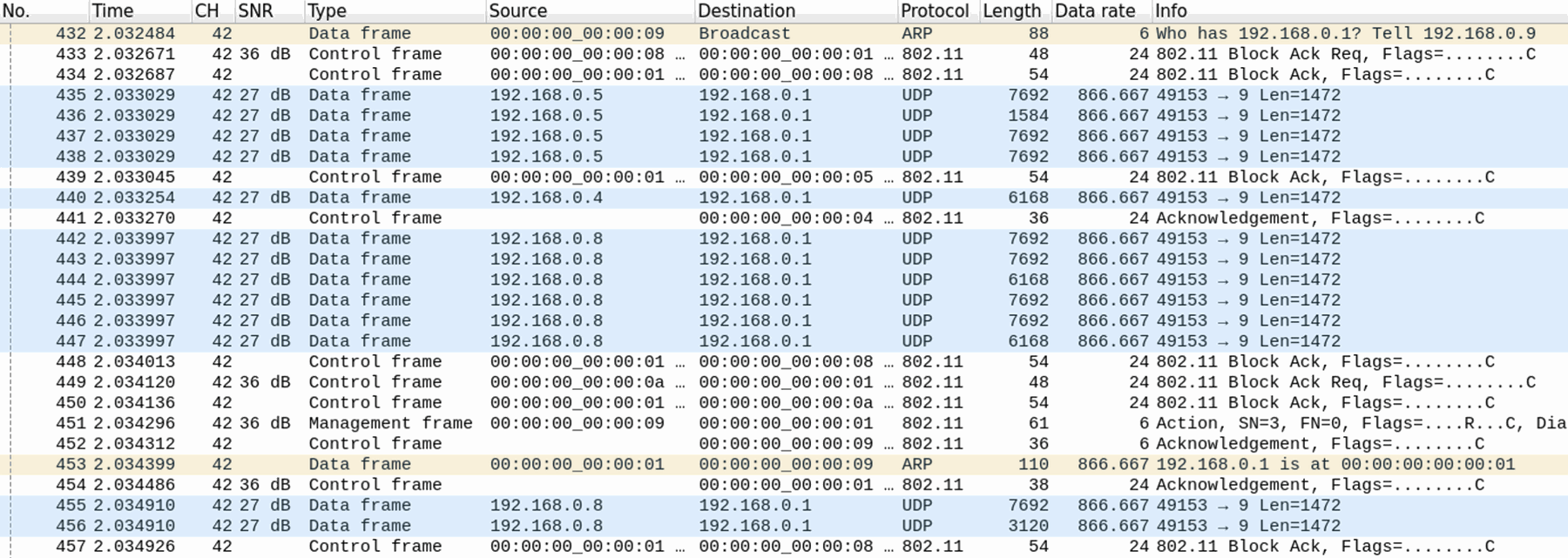
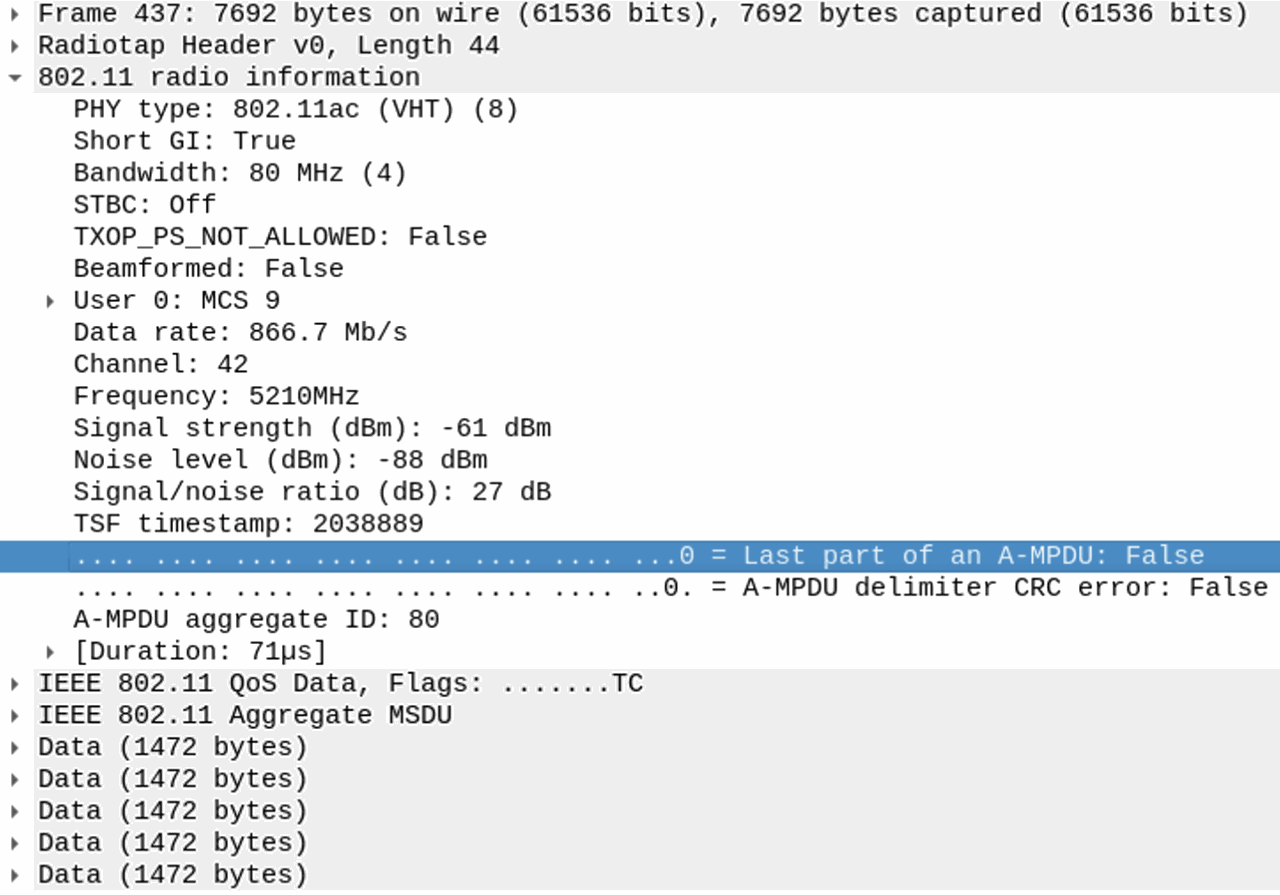
PCAP ファイルを Wireshark で開くと、A-MPDU フレームが観察できるので、A-MPDU は使えてることがわかる。
FlowMonitor でスループットを見てみる: A-MSDU 有効 と同じ結果
平均スループット(10 フローの RX bitrate の平均)は 56.1 Mbps。
flowmon-parse-results.py の実行結果(A-MPDU 有効)
ishigaki@ishigaki-NS3:~/ns-allinone-3.44/ns-3.44$ python3 flowmon-parse-results.py A-MPDU_Flow.xml
Reading XML file  . done.
FlowID: 1 (UDP 192.168.0.2/49153 --> 192.168.0.1/9)
    TX bitrate: 61142.42 kbit/s
    RX bitrate: 53402.83 kbit/s
    Mean Delay: 318.23 ms
    Packet Loss Ratio: 0.38 %
FlowID: 2 (UDP 192.168.0.3/49153 --> 192.168.0.1/9)
    TX bitrate: 61142.42 kbit/s
    RX bitrate: 58907.01 kbit/s
    Mean Delay: 203.31 ms
    Packet Loss Ratio: 0.07 %
FlowID: 3 (UDP 192.168.0.4/49153 --> 192.168.0.1/9)
    TX bitrate: 61142.42 kbit/s
    RX bitrate: 58314.17 kbit/s
    Mean Delay: 299.00 ms
    Packet Loss Ratio: 0.28 %
FlowID: 4 (UDP 192.168.0.5/49153 --> 192.168.0.1/9)
    TX bitrate: 61142.42 kbit/s
    RX bitrate: 59014.38 kbit/s
    Mean Delay: 426.02 ms
    Packet Loss Ratio: 1.55 %
FlowID: 5 (UDP 192.168.0.6/49153 --> 192.168.0.1/9)
    TX bitrate: 61142.42 kbit/s
    RX bitrate: 53792.42 kbit/s
    Mean Delay: 287.62 ms
    Packet Loss Ratio: 0.49 %
FlowID: 6 (UDP 192.168.0.7/49153 --> 192.168.0.1/9)
    TX bitrate: 61142.42 kbit/s
    RX bitrate: 53024.70 kbit/s
    Mean Delay: 587.06 ms
    Packet Loss Ratio: 1.40 %
FlowID: 7 (UDP 192.168.0.8/49153 --> 192.168.0.1/9)
    TX bitrate: 61142.42 kbit/s
    RX bitrate: 60342.05 kbit/s
    Mean Delay: 233.29 ms
    Packet Loss Ratio: 0.27 %
FlowID: 8 (UDP 192.168.0.9/49153 --> 192.168.0.1/9)
    TX bitrate: 61142.42 kbit/s
    RX bitrate: 54480.35 kbit/s
    Mean Delay: 356.23 ms
    Packet Loss Ratio: 0.17 %
FlowID: 9 (UDP 192.168.0.10/49153 --> 192.168.0.1/9)
    TX bitrate: 61142.42 kbit/s
    RX bitrate: 54061.14 kbit/s
    Mean Delay: 785.39 ms
    Packet Loss Ratio: 3.43 %
FlowID: 10 (UDP 192.168.0.11/49153 --> 192.168.0.1/9)
    TX bitrate: 61142.42 kbit/s
    RX bitrate: 55809.12 kbit/s
    Mean Delay: 377.11 ms
    Packet Loss Ratio: 0.54 %
A-MPDU を無効にしたシミュレーション
ishigaki@ishigaki-NS3:~/ns-allinone-3.44/ns-3.44$ ./ns3 run "scratch/A-MPDU_simulation.cc --ampduDisable=true"

ishigaki@ishigaki-NS3:~/ns-allinone-3.44/ns-3.44$ ls -l A-MPDU_AP_ampduDisable.pcap
-rw-rw-r-- 1 ishigaki ishigaki 287437929  9月 29 15:50 A-MPDU_AP_ampduDisable.pcap

ishigaki@ishigaki-NS3:~/ns-allinone-3.44/ns-3.44$ ls -l A-MPDU_Flow_ampduDisable.xml
-rw-rw-r-- 1 ishigaki ishigaki 1274660  9月 29 15:50 A-MPDU_Flow_ampduDisable.xml

ishigaki@ishigaki-NS3:~/ns-allinone-3.44/ns-3.44$ ls -l A-MPDU_NetAnim_ampduDisable.xml
-rw-rw-r-- 1 ishigaki ishigaki 18747006  9月 29 15:48 A-MPDU_NetAnim_ampduDisable.xml
PCAP ファイルを見ると、A-MPDU は観察できなくて、Data フレームごとに Ack フレームが返ってきてるのがわかる。
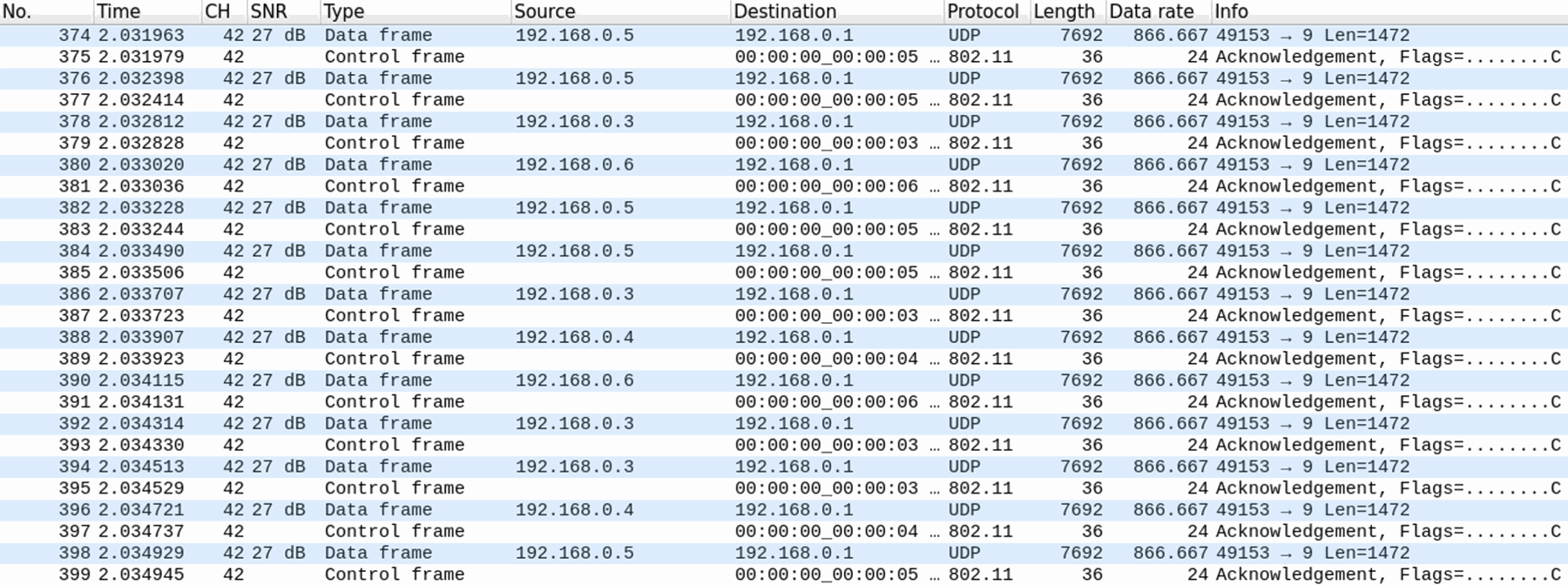
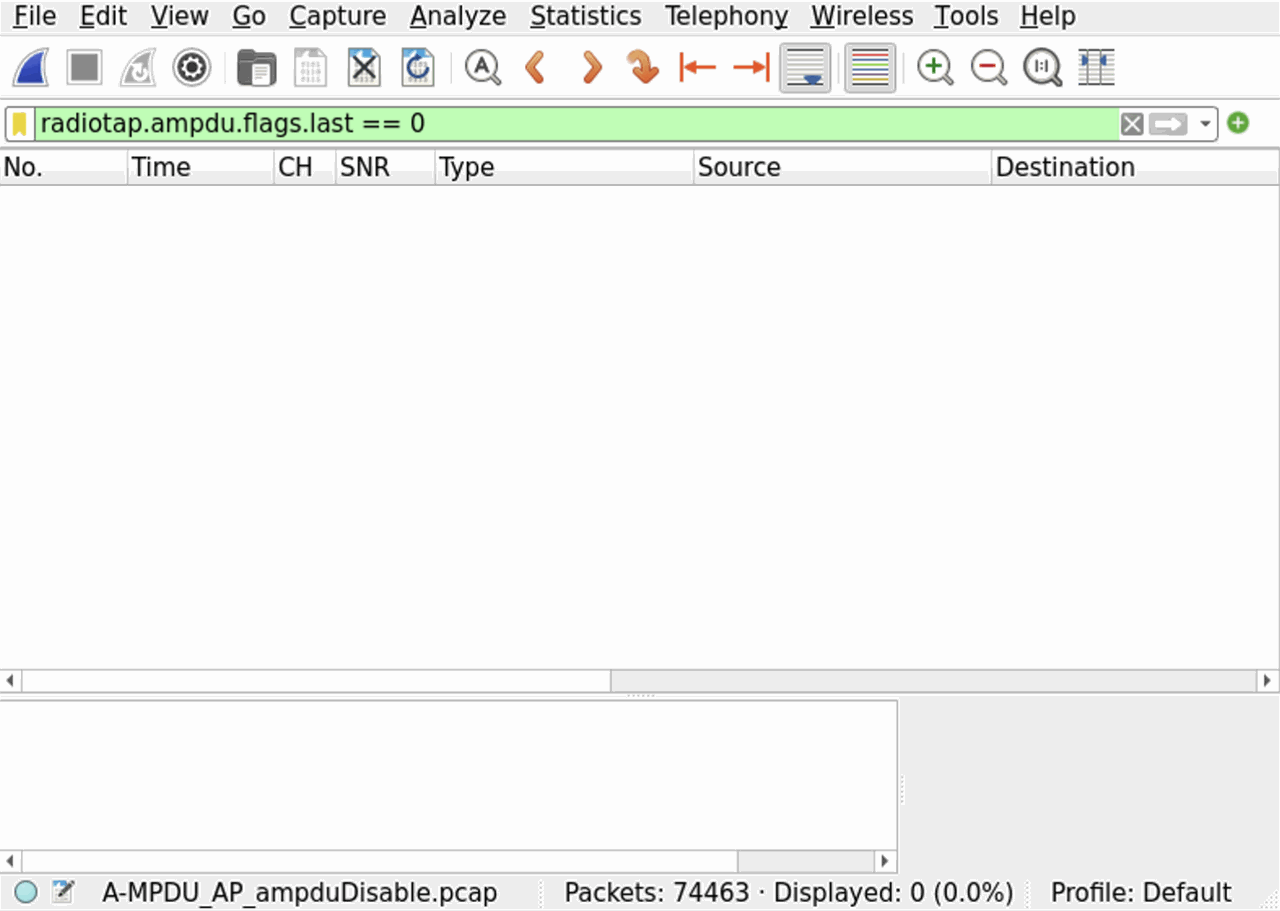
FlowMonitor でスループットを見てみる。
平均スループット(10 フローの RX bitrate の平均)は 22.3 Mbps。
flowmon-parse-results.py の実行結果(A-MPDU 無効)
ishigaki@ishigaki-NS3:~/ns-allinone-3.44/ns-3.44$ python3 flowmon-parse-results.py A-MPDU_Flow_ampduDisable.xml
Reading XML file  . done.
FlowID: 1 (UDP 192.168.0.2/49153 --> 192.168.0.1/9)
    TX bitrate: 61142.42 kbit/s
    RX bitrate: 22596.81 kbit/s
    Mean Delay: 2828.56 ms
    Packet Loss Ratio: 53.17 %
FlowID: 2 (UDP 192.168.0.3/49153 --> 192.168.0.1/9)
    TX bitrate: 61142.42 kbit/s
    RX bitrate: 21505.92 kbit/s
    Mean Delay: 3140.37 ms
    Packet Loss Ratio: 55.48 %
FlowID: 3 (UDP 192.168.0.4/49153 --> 192.168.0.1/9)
    TX bitrate: 61142.42 kbit/s
    RX bitrate: 22826.80 kbit/s
    Mean Delay: 2987.98 ms
    Packet Loss Ratio: 52.40 %
FlowID: 4 (UDP 192.168.0.5/49153 --> 192.168.0.1/9)
    TX bitrate: 61142.42 kbit/s
    RX bitrate: 22803.29 kbit/s
    Mean Delay: 2891.42 ms
    Packet Loss Ratio: 52.68 %
FlowID: 5 (UDP 192.168.0.6/49153 --> 192.168.0.1/9)
    TX bitrate: 61142.42 kbit/s
    RX bitrate: 21048.54 kbit/s
    Mean Delay: 2879.34 ms
    Packet Loss Ratio: 56.27 %
FlowID: 6 (UDP 192.168.0.7/49153 --> 192.168.0.1/9)
    TX bitrate: 61142.42 kbit/s
    RX bitrate: 22587.80 kbit/s
    Mean Delay: 2737.41 ms
    Packet Loss Ratio: 52.95 %
FlowID: 7 (UDP 192.168.0.8/49153 --> 192.168.0.1/9)
    TX bitrate: 61142.42 kbit/s
    RX bitrate: 21863.21 kbit/s
    Mean Delay: 2860.07 ms
    Packet Loss Ratio: 54.54 %
FlowID: 8 (UDP 192.168.0.9/49153 --> 192.168.0.1/9)
    TX bitrate: 61142.42 kbit/s
    RX bitrate: 23088.89 kbit/s
    Mean Delay: 2997.79 ms
    Packet Loss Ratio: 51.96 %
FlowID: 9 (UDP 192.168.0.10/49153 --> 192.168.0.1/9)
    TX bitrate: 61142.42 kbit/s
    RX bitrate: 23348.65 kbit/s
    Mean Delay: 2893.04 ms
    Packet Loss Ratio: 51.63 %
FlowID: 10 (UDP 192.168.0.11/49153 --> 192.168.0.1/9)
    TX bitrate: 61142.42 kbit/s
    RX bitrate: 21332.26 kbit/s
    Mean Delay: 3042.72 ms
    Packet Loss Ratio: 56.10 %
結果の考察
- A-MPDU を無効にすると、平均スループットは 56.1 Mbps → 22.3 Mbps に下がった(約 40%)
- 10 フローの合計でも 561.1 Mbps → 223.0 Mbps
- 平均遅延は 387.3 ms → 2925.9 ms、パケットロス率の平均は 0.86 % → 53.72 % に悪化した
- どの STA も 61.1 Mbps(IP 層)で送り続けているので、送りきれなかった分が遅延とロスとして出てきている
- PCAP を見ると、A-MPDU 無効では Data フレーム(A-MSDU)を 1 つ送るたびに Ack が返ってきていて、A-MPDU 有効では複数の MPDU をまとめて送って BlockAck フレームでまとめて確認応答している
- 送信 1 回ごとに、チャネルアクセスの待ち時間(AIFS・バックオフ)、プリアンブル、SIFS、Ack といったオーバーヘッドがかかる
- A-MPDU なら、このオーバーヘッドを複数の MPDU で分け合えるので、データを送っている時間の割合が大きくなる
- A-MPDU は QoS Data フレームの送信だけでなく、ACK も効率化できる
- A-MPDU 無効では MPDU を 1 つ送るたびに Ack が返ってくるけど、A-MPDU 有効では A-MPDU 全体に対して BlockAck フレームが 1 つ返ってくるだけで済む
- このシミュレーションでは TXOP limit が 0 なので、ACK を効率化できるのは A-MPDU に対する BlockAck フレームだけ
- A-MSDU の比較(56.1 Mbps → 49.1 Mbps)より、A-MPDU の方が影響がずっと大きい
- A-MSDU を無効にしても A-MPDU で MPDU をまとめられるけど、A-MPDU を無効にすると 1 回の送信で送れるのは A-MSDU 1 つ(最大 7935 バイト)だけになる
A-MSDU も A-MPDU も無効にしたシミュレーション
下記の scratch/bothDisable.cc で、A-MSDU も A-MPDU も無効にしてシミュレーションしてみた。
scratch/bothDisable.cc
/* -*- Mode:C++; c-file-style:"gnu"; indent-tabs-mode:nil; -*- */
/*
 * bothDisable.cc
 *
 * This ns-3 simulation demonstrates a Wi-Fi network scenario in which
 * both A-MSDU and A-MPDU aggregation are disabled, providing a baseline
 * for performance comparison against aggregation-enabled cases.
 *
 * Simulation Scenario:
 * - One AP and multiple STA nodes (default 10 STAs)
 * - All STAs send UDP traffic to the AP using OnOff applications
 * - Nodes are arranged in a circle around the AP
 * - FlowMonitor is used to collect statistics
 * - NetAnim output is generated for visualization
 * - No MAC aggregation: BE_MaxAmsduSize = 0, BE_MaxAmpduSize = 0
 *
 * Key Features:
 * - IEEE 802.11ac (80 MHz, 2x2 MIMO, VHT MCS9, Short GI)
 * - Aggregation completely disabled (A-MSDU and A-MPDU)
 * - Generates PCAP, FlowMonitor XML, and NetAnim XML outputs
 *
 * Command Line Usage:
 *   ./ns3 run "scratch/bothDisable.cc"
 *
 * Output Files:
 *   bothDisable_AP.pcap
 *   bothDisable_Flow.xml
 *   bothDisable_NetAnim.xml
 *
 * Author: TASUKU ISHIGAKI
 * Date: August 2025
 */

#include "ns3/applications-module.h"
#include "ns3/core-module.h"
#include "ns3/csma-module.h"
#include "ns3/flow-monitor-module.h"
#include "ns3/internet-module.h"
#include "ns3/mobility-module.h"
#include "ns3/netanim-module.h"
#include "ns3/network-module.h"
#include "ns3/ssid.h"
#include "ns3/yans-wifi-helper.h"

#include <sstream>
#include <string>

using namespace ns3;

NS_LOG_COMPONENT_DEFINE("bothDisable_simulation");

int
main(int argc, char* argv[])
{
    ////
    // Nodes, Devices, Topologies
    ////

    uint32_t nWifi = 10;
    double center = 10.0;
    double radius = 10.0;
    uint32_t MaxAmsduSize = 0; // Fixed Parameter
    uint32_t MaxAmpduSize = 0; // Fixed Parameter
    std::string DataRate = "60Mbps";
    std::string pcapFile = "bothDisable_AP.pcap";
    std::string flowmonFile = "bothDisable_Flow.xml";
    std::string netanimFile = "bothDisable_NetAnim.xml";
    bool ampduDisable{false};

    CommandLine cmd(__FILE__);
    cmd.AddValue("ampduDisable", "Run this simulation without A-MPDU", ampduDisable);
    cmd.Parse(argc, argv);

    NodeContainer allNodes;
    NodeContainer wifiStaNodes;
    wifiStaNodes.Create(nWifi);
    allNodes.Add(wifiStaNodes);
    NodeContainer wifiApNode;
    wifiApNode.Create(1);
    allNodes.Add(wifiApNode);

    YansWifiChannelHelper channel = YansWifiChannelHelper::Default();
    YansWifiPhyHelper phy;
    phy.SetChannel(channel.Create());
    phy.Set("Antennas", UintegerValue(2));
    phy.Set("MaxSupportedTxSpatialStreams", UintegerValue(2));
    phy.Set("MaxSupportedRxSpatialStreams", UintegerValue(2));
    phy.Set("ChannelSettings", StringValue("{42, 80, BAND_5GHZ, 0}"));

    WifiHelper wifi;
    wifi.SetStandard(WIFI_STANDARD_80211ac);
    wifi.SetRemoteStationManager("ns3::ConstantRateWifiManager",
                                 "DataMode", StringValue("VhtMcs9"),
                                 "ControlMode", StringValue("VhtMcs9"));
    wifi.ConfigHtOptions("ShortGuardIntervalSupported", BooleanValue(true));
    WifiMacHelper mac;
    Ssid ssid = Ssid("ishigaki-wlan");

    mac.SetType("ns3::ApWifiMac",
                "Ssid", SsidValue(ssid),
                "BE_MaxAmsduSize", UintegerValue(MaxAmsduSize),
                "BE_MaxAmpduSize", UintegerValue(MaxAmpduSize));
    NetDeviceContainer apDevices;
    apDevices = wifi.Install(phy, mac, wifiApNode);
    phy.SetPcapDataLinkType(YansWifiPhyHelper::DLT_IEEE802_11_RADIO);
    phy.EnablePcap(pcapFile, apDevices.Get(0), false, true);

    mac.SetType("ns3::StaWifiMac",
                "Ssid", SsidValue(ssid),
                "ActiveProbing", BooleanValue(false),
                "BE_MaxAmsduSize", UintegerValue(MaxAmsduSize),
                "BE_MaxAmpduSize", UintegerValue(MaxAmpduSize));
    NetDeviceContainer staDevices;
    staDevices = wifi.Install(phy, mac, wifiStaNodes);

    ////
    // Mobility
    ////

    MobilityHelper mobility;
    Ptr<ListPositionAllocator> positionAlloc = CreateObject<ListPositionAllocator>();
    mobility.SetMobilityModel("ns3::ConstantPositionMobilityModel");
    positionAlloc->Add(Vector(center, center, 0.0));
    // Set position for STAs
    for (uint32_t i = 0; i < nWifi; ++i)
    {
        double angle = 2 * M_PI * i / nWifi;
        double x = radius * std::cos(angle);
        double y = radius * std::sin(angle);
        positionAlloc->Add(Vector(center + x, center + y, 0.0));
    }
    mobility.SetPositionAllocator(positionAlloc);
    mobility.Install(wifiApNode);
    mobility.Install(wifiStaNodes);

    ////
    // Install internet stack
    ////

    InternetStackHelper stack;
    stack.Install(allNodes);

    ////
    // Install Ipv4 addresses
    ////

    Ipv4AddressHelper address;

    //// AP, STAs IP
    address.SetBase("192.168.0.0", "255.255.255.0");
    Ipv4InterfaceContainer apInterface;
    apInterface = address.Assign(apDevices);
    Ipv4InterfaceContainer staInterfaces;
    staInterfaces = address.Assign(staDevices);

    ////
    // Install applications
    ////

    uint16_t port = 9;
    Address sinkAddress(InetSocketAddress(apInterface.GetAddress(0), port));
    PacketSinkHelper sinkHelper("ns3::UdpSocketFactory", sinkAddress);
    ApplicationContainer sinkApps = sinkHelper.Install(wifiApNode.Get(0));
    sinkApps.Start(Seconds(1.0));
    sinkApps.Stop(Seconds(12.0));
    OnOffHelper onOff("ns3::UdpSocketFactory", sinkAddress);
    onOff.SetAttribute("DataRate", StringValue(DataRate));
    onOff.SetAttribute("PacketSize", UintegerValue(1472));
    onOff.SetAttribute("Tos", UintegerValue(0x00)); // AC_BE
    onOff.SetAttribute("OnTime", StringValue("ns3::ConstantRandomVariable[Constant=1.0]"));
    onOff.SetAttribute("OffTime", StringValue("ns3::ConstantRandomVariable[Constant=0.0]"));
    onOff.SetAttribute("StartTime", TimeValue(Seconds(2.0)));
    onOff.SetAttribute("StopTime", TimeValue(Seconds(12.0)));
    ApplicationContainer clientApps = onOff.Install(wifiStaNodes);

    Simulator::Stop(Seconds(12));

    ////
    // Flowmonitor
    ////

    Ptr<FlowMonitor> flowmon;
    FlowMonitorHelper flowmonHelper;
    flowmon = flowmonHelper.InstallAll();

    ////
    // Animation
    ////

    AnimationInterface anim(netanimFile);

    uint32_t apImageId = anim.AddResource("AP.png");
    uint32_t apNodeId = wifiApNode.Get(0)->GetId();
    anim.UpdateNodeDescription(apNodeId, "AP");
    anim.UpdateNodeImage(apNodeId, apImageId);
    anim.UpdateNodeSize(apNodeId, 1.0, 1.0);

    uint32_t staImageId = anim.AddResource("STA.png");
    for (uint32_t i = 0; i < wifiStaNodes.GetN(); ++i)
    {
        uint32_t nodeId = wifiStaNodes.Get(i)->GetId();
        std::ostringstream oss;
        oss << "STA-" << i;
        anim.UpdateNodeDescription(nodeId, oss.str());
        anim.UpdateNodeImage(nodeId, staImageId);
        anim.UpdateNodeSize(nodeId, 1.0, 1.0);
    }

    anim.EnablePacketMetadata();

    Simulator::Run();
    flowmon->SerializeToXmlFile(flowmonFile, true, true);
    Simulator::Destroy();
    return 0;
}
FlowMonitor の結果
flowmon-parse-results.py の実行結果(A-MSDU も A-MPDU も無効)
ishigaki@ishigaki-NS3:~/ns-allinone-3.44/ns-3.44$ python3 flowmon-parse-results.py bothDisable_Flow.xml
Reading XML file  . done.
FlowID: 1 (UDP 192.168.0.2/49153 --> 192.168.0.1/9)
    TX bitrate: 61142.42 kbit/s
    RX bitrate: 5926.06 kbit/s
    Mean Delay: 3925.27 ms
    Packet Loss Ratio: 86.11 %
FlowID: 2 (UDP 192.168.0.3/49153 --> 192.168.0.1/9)
    TX bitrate: 61142.42 kbit/s
    RX bitrate: 5239.12 kbit/s
    Mean Delay: 3948.45 ms
    Packet Loss Ratio: 87.41 %
FlowID: 3 (UDP 192.168.0.4/49153 --> 192.168.0.1/9)
    TX bitrate: 61142.42 kbit/s
    RX bitrate: 5736.86 kbit/s
    Mean Delay: 3960.88 ms
    Packet Loss Ratio: 86.37 %
FlowID: 4 (UDP 192.168.0.5/49153 --> 192.168.0.1/9)
    TX bitrate: 61142.42 kbit/s
    RX bitrate: 6023.11 kbit/s
    Mean Delay: 3695.83 ms
    Packet Loss Ratio: 85.85 %
FlowID: 5 (UDP 192.168.0.6/49153 --> 192.168.0.1/9)
    TX bitrate: 61142.42 kbit/s
    RX bitrate: 5718.66 kbit/s
    Mean Delay: 3705.87 ms
    Packet Loss Ratio: 86.36 %
FlowID: 6 (UDP 192.168.0.7/49153 --> 192.168.0.1/9)
    TX bitrate: 61142.42 kbit/s
    RX bitrate: 5426.03 kbit/s
    Mean Delay: 3836.12 ms
    Packet Loss Ratio: 87.02 %
FlowID: 7 (UDP 192.168.0.8/49153 --> 192.168.0.1/9)
    TX bitrate: 61142.42 kbit/s
    RX bitrate: 5699.42 kbit/s
    Mean Delay: 3679.12 ms
    Packet Loss Ratio: 86.46 %
FlowID: 8 (UDP 192.168.0.9/49153 --> 192.168.0.1/9)
    TX bitrate: 61142.42 kbit/s
    RX bitrate: 5688.84 kbit/s
    Mean Delay: 3742.42 ms
    Packet Loss Ratio: 86.49 %
FlowID: 9 (UDP 192.168.0.10/49153 --> 192.168.0.1/9)
    TX bitrate: 61142.42 kbit/s
    RX bitrate: 5911.20 kbit/s
    Mean Delay: 4012.88 ms
    Packet Loss Ratio: 86.00 %
FlowID: 10 (UDP 192.168.0.11/49153 --> 192.168.0.1/9)
    TX bitrate: 61142.42 kbit/s
    RX bitrate: 5553.54 kbit/s
    Mean Delay: 3955.41 ms
    Packet Loss Ratio: 86.72 %
Frame Aggregation の検証のまとめ
シミュレーションの結果をまとめると、下の表のようになる。 どの条件でも STA は同じ 61.14 Mbps(IP 層)で送り続けているので、受信スループットとパケットロスの違いが、そのまま Frame Aggregation の効果になっている。
BE_MaxAmsduSize |
BE_MaxAmpduSize |
平均送信スループット | 平均受信スループット | 平均パケットロス |
|---|---|---|---|---|
| 7935 | 1048575 | 61.14 Mbps | 56.11 Mbps | 0.86 % |
| 0 | 1048575 | 61.14 Mbps | 49.14 Mbps | 5.39 % |
| 7935 | 0 | 61.14 Mbps | 22.30 Mbps | 53.72 % |
| 0 | 0 | 61.14 Mbps | 5.69 Mbps | 86.48 % |
- A-MSDU と A-MPDU の両方を使うと、平均受信スループットは 56.11 Mbps で、4 つの中で一番高い(送信の約 92%)
- どちらか片方だけ無効にすると、A-MSDU 無効で 49.14 Mbps(約 12% 低下)、A-MPDU 無効で 22.30 Mbps(約 60% 低下)になって、A-MPDU の方が影響がずっと大きい
- 両方とも無効にすると 5.69 Mbps まで下がって、両方使ったときの約 1/10 になる
- A-MSDU の効果は、A-MPDU があるかどうかで大きく変わる
- A-MPDU 有効のときは、A-MSDU があると 49.14 Mbps → 56.11 Mbps(約 1.1 倍)
- A-MPDU 無効のときは、A-MSDU があると 5.69 Mbps → 22.30 Mbps(約 3.9 倍)
- A-MPDU がないと 1 回の送信で送れる MPDU は 1 つだけなので、その 1 つに MSDU を 5 つ詰められる A-MSDU の効果が大きく出ている
引数と属性の調べ方
コードを実行するときに、--PrintHelp をつければ、そのコードを実行するときに使える引数を調べられる。
例えば、examples/wireless/wifi-vht-network.cc だと、下記のように STA と AP の距離・シミュレーション時間・UDP or TCP などなど選択して実行できることがわかる。
ishigaki@ishigaki-NS3:~/ns-allinone-3.44/ns-3.44$ ./ns3 run "examples/wireless/wifi-vht-network.cc --PrintHelp"
wifi-vht-network [Program Options] [General Arguments]

Program Options:
    --distance:               Distance in meters between the station and the access point [1]
    --simulationTime:         Simulation time [+10s]
    --udp:                    UDP if set to 1, TCP otherwise [true]
    --useRts:                 Enable/disable RTS/CTS [false]
    --use80Plus80:            Enable/disable use of 80+80 MHz [false]
    --mcs:                    list of comma separated MCS values to test; if unset, all MCS values (0-9) are tested
    --phyModel:               PHY model to use (Yans or Spectrum). If 80+80 MHz is enabled, then Spectrum is automatically selected [Yans]
    --channelWidth:           if set, limit testing to a specific channel width expressed in MHz (20, 40, 80 or 160 MHz) [-1]
    --guardInterval:          if set, limit testing to a specific guard interval duration expressed in nanoseconds (800 or 400 ns) [-1]
    --minExpectedThroughput:  if set, simulation fails if the lowest throughput is below this value [0]
    --maxExpectedThroughput:  if set, simulation fails if the highest throughput is above this value [0]

General Arguments:
    --PrintGlobals:              Print the list of globals.
    --PrintGroups:               Print the list of groups.
    --PrintGroup=[group]:        Print all TypeIds of group.
    --PrintTypeIds:              Print all TypeIds.
    --PrintAttributes=[typeid]:  Print all attributes of typeid.
    --PrintVersion:              Print the ns-3 version.
    --PrintHelp:                 Print this help message.
コードを実行するときに、--PrintTypeIds をつければ、そのプログラムに組み込まれた ns-3 のライブラリにあるクラスの一覧を表示できる。
--PrintTypeIds の実行結果
ishigaki@ishigaki-NS3:~/ns-allinone-3.44/ns-3.44$ ./ns3 run "examples/wireless/wifi-vht-network.cc --PrintTypeIds"
Registered TypeIds:
    ns3::AarfWifiManager
    ns3::AarfcdWifiManager
    ns3::AdhocWifiMac
    ns3::AdvancedApEmlsrManager
    ns3::AdvancedEmlsrManager
    ns3::AlohaNoackMacHeader
    ns3::AlohaNoackNetDevice
    ns3::AlwaysLosChannelConditionModel
    ns3::AmpduSubframeHeader
    ns3::AmpduTag
    ns3::AmrrWifiManager
    ns3::AmsduSubframeHeader
    ns3::AntennaModel
    ns3::ApEmlsrManager
    ns3::ApWifiMac
    ns3::AparfWifiManager
    ns3::Application
    ns3::ApplicationPacketProbe
    ns3::ArfWifiManager
    ns3::ArpCache
    ns3::ArpHeader
    ns3::ArpL3Protocol
    ns3::AthstatsWifiTraceSink
    ns3::BernoulliRandomVariable
    ns3::BinaryErrorModel
    ns3::BinomialRandomVariable
    ns3::BlockAckManager
    ns3::BooleanProbe
    ns3::BridgeChannel
    ns3::BridgeNetDevice
    ns3::BulkSendApplication
    ns3::BurstErrorModel
    ns3::CalendarScheduler
    ns3::CaraWifiManager
    ns3::Channel
    ns3::ChannelAccessManager
    ns3::ChannelCondition
    ns3::ChannelConditionModel
    ns3::ChannelListPriv
    ns3::Chunk
    ns3::CircularApertureAntennaModel
    ns3::CoDelQueueDisc
    ns3::CobaltQueueDisc
    ns3::ConstantAccelerationMobilityModel
    ns3::ConstantObssPdAlgorithm
    ns3::ConstantPositionMobilityModel
    ns3::ConstantRandomVariable
    ns3::ConstantRateWifiManager
    ns3::ConstantSpectrumPropagationLossModel
    ns3::ConstantSpeedPropagationDelayModel
    ns3::ConstantVelocityMobilityModel
    ns3::CosineAntennaModel
    ns3::Cost231PropagationLossModel
    ns3::CounterCalculator<uint32_t>
    ns3::CtrlBAckRequestHeader
    ns3::CtrlBAckResponseHeader
    ns3::CtrlTriggerHeader
    ns3::DataCollectionObject
    ns3::DefaultApEmlsrManager
    ns3::DefaultEmlsrManager
    ns3::DefaultSimulatorImpl
    ns3::DeterministicRandomVariable
    ns3::DeviceNameTag
    ns3::DoubleProbe
    ns3::DropTailQueue<Packet>
    ns3::DropTailQueue<QueueDiscItem>
    ns3::DynamicQueueLimits
    ns3::EhtConfiguration
    ns3::EhtFrameExchangeManager
    ns3::EmlsrManager
    ns3::EmpiricalRandomVariable
    ns3::ErlangRandomVariable
    ns3::ErrorChannel
    ns3::ErrorModel
    ns3::ErrorRateModel
    ns3::EthernetHeader
    ns3::EthernetTrailer
    ns3::ExponentialRandomVariable
    ns3::FcfsWifiQueueScheduler
    ns3::FifoQueueDisc
    ns3::FileAggregator
    ns3::FilsDiscHeader
    ns3::FixedRssLossModel
    ns3::FlowIdTag
    ns3::FqCoDelFlow
    ns3::FqCoDelQueueDisc
    ns3::FqCobaltFlow
    ns3::FqCobaltQueueDisc
    ns3::FqPieFlow
    ns3::FqPieQueueDisc
    ns3::FrameCaptureModel
    ns3::FrameExchangeManager
    ns3::FriisPropagationLossModel
    ns3::FriisSpectrumPropagationLossModel
    ns3::GammaRandomVariable
    ns3::GaussMarkovMobilityModel
    ns3::GcrManager
    ns3::GeocentricConstantPositionMobilityModel
    ns3::GlobalRouter
    ns3::GnuplotAggregator
    ns3::GridPositionAllocator
    ns3::HalfDuplexIdealPhy
    ns3::HeConfiguration
    ns3::HeFrameExchangeManager
    ns3::Header
    ns3::HeapScheduler
    ns3::HierarchicalMobilityModel
    ns3::HtConfiguration
    ns3::HtFrameExchangeManager
    ns3::Icmpv4DestinationUnreachable
    ns3::Icmpv4Echo
    ns3::Icmpv4Header
    ns3::Icmpv4L4Protocol
    ns3::Icmpv4TimeExceeded
    ns3::Icmpv6DestinationUnreachable
    ns3::Icmpv6Echo
    ns3::Icmpv6Header
    ns3::Icmpv6L4Protocol
    ns3::Icmpv6NA
    ns3::Icmpv6NS
    ns3::Icmpv6OptionHeader
    ns3::Icmpv6OptionLinkLayerAddress
    ns3::Icmpv6OptionMtu
    ns3::Icmpv6OptionPrefixInformation
    ns3::Icmpv6OptionRedirected
    ns3::Icmpv6ParameterError
    ns3::Icmpv6RA
    ns3::Icmpv6RS
    ns3::Icmpv6Redirection
    ns3::Icmpv6TimeExceeded
    ns3::Icmpv6TooBig
    ns3::IdealWifiManager
    ns3::InterferenceHelper
    ns3::IpL4Protocol
    ns3::Ipv4
    ns3::Ipv4GlobalRouting
    ns3::Ipv4Header
    ns3::Ipv4Interface
    ns3::Ipv4L3Protocol
    ns3::Ipv4ListRouting
    ns3::Ipv4PacketFilter
    ns3::Ipv4PacketProbe
    ns3::Ipv4RawSocketFactory
    ns3::Ipv4RawSocketImpl
    ns3::Ipv4RoutingProtocol
    ns3::Ipv4StaticRouting
    ns3::Ipv6
    ns3::Ipv6Extension
    ns3::Ipv6ExtensionAH
    ns3::Ipv6ExtensionAHHeader
    ns3::Ipv6ExtensionDemux
    ns3::Ipv6ExtensionDestination
    ns3::Ipv6ExtensionDestinationHeader
    ns3::Ipv6ExtensionESP
    ns3::Ipv6ExtensionESPHeader
    ns3::Ipv6ExtensionFragment
    ns3::Ipv6ExtensionFragmentHeader
    ns3::Ipv6ExtensionHeader
    ns3::Ipv6ExtensionHopByHop
    ns3::Ipv6ExtensionHopByHopHeader
    ns3::Ipv6ExtensionLooseRouting
    ns3::Ipv6ExtensionLooseRoutingHeader
    ns3::Ipv6ExtensionRouting
    ns3::Ipv6ExtensionRoutingDemux
    ns3::Ipv6ExtensionRoutingHeader
    ns3::Ipv6Header
    ns3::Ipv6Interface
    ns3::Ipv6L3Protocol
    ns3::Ipv6ListRouting
    ns3::Ipv6Option
    ns3::Ipv6OptionDemux
    ns3::Ipv6OptionHeader
    ns3::Ipv6OptionJumbogram
    ns3::Ipv6OptionJumbogramHeader
    ns3::Ipv6OptionPad1
    ns3::Ipv6OptionPad1Header
    ns3::Ipv6OptionPadn
    ns3::Ipv6OptionPadnHeader
    ns3::Ipv6OptionRouterAlert
    ns3::Ipv6OptionRouterAlertHeader
    ns3::Ipv6PacketFilter
    ns3::Ipv6PacketProbe
    ns3::Ipv6PmtuCache
    ns3::Ipv6RawSocketFactory
    ns3::Ipv6RawSocketImpl
    ns3::Ipv6RoutingProtocol
    ns3::Ipv6StaticRouting
    ns3::IsotropicAntennaModel
    ns3::ItuR1411LosPropagationLossModel
    ns3::ItuR1411NlosOverRooftopPropagationLossModel
    ns3::JakesProcess
    ns3::JakesPropagationLossModel
    ns3::Kun2600MhzPropagationLossModel
    ns3::LaplacianRandomVariable
    ns3::LargestExtremeValueRandomVariable
    ns3::LinearWifiTxCurrentModel
    ns3::ListErrorModel
    ns3::ListPositionAllocator
    ns3::ListScheduler
    ns3::LlcSnapHeader
    ns3::LogDistancePropagationLossModel
    ns3::LogNormalRandomVariable
    ns3::LoopbackNetDevice
    ns3::MapScheduler
    ns3::MatrixPropagationLossModel
    ns3::MgtAddBaRequestHeader
    ns3::MgtAddBaResponseHeader
    ns3::MgtAssocRequestHeader
    ns3::MgtAssocResponseHeader
    ns3::MgtBeaconHeader
    ns3::MgtDelBaHeader
    ns3::MgtEmlOperatingModeNotification
    ns3::MgtProbeRequestHeader
    ns3::MgtProbeResponseHeader
    ns3::MgtReassocRequestHeader
    ns3::MinstrelHtWifiManager
    ns3::MinstrelWifiManager
    ns3::MobilityModel
    ns3::MpduAggregator
    ns3::MqQueueDisc
    ns3::MsduAggregator
    ns3::MuSnrTag
    ns3::MultiModelSpectrumChannel
    ns3::MultiUserScheduler
    ns3::NakagamiPropagationLossModel
    ns3::NdiscCache
    ns3::NetDevice
    ns3::NetDeviceQueue
    ns3::NetDeviceQueueInterface
    ns3::NeverLosChannelConditionModel
    ns3::NeverLosVehicleChannelConditionModel
    ns3::NistErrorRateModel
    ns3::Node
    ns3::NodeListPriv
    ns3::NonCommunicatingNetDevice
    ns3::NormalRandomVariable
    ns3::Object
    ns3::ObjectBase
    ns3::ObssPdAlgorithm
    ns3::OkumuraHataPropagationLossModel
    ns3::OnOffApplication
    ns3::OnoeWifiManager
    ns3::PacketBurst
    ns3::PacketFilter
    ns3::PacketProbe
    ns3::PacketSink
    ns3::PacketSocket
    ns3::PacketSocketClient
    ns3::PacketSocketFactory
    ns3::PacketSocketServer
    ns3::PacketSocketTag
    ns3::ParabolicAntennaModel
    ns3::ParetoRandomVariable
    ns3::ParfWifiManager
    ns3::PbbPacket
    ns3::PcapFileWrapper
    ns3::PfifoFastQueueDisc
    ns3::PhasedArrayModel
    ns3::PhasedArraySpectrumPropagationLossModel
    ns3::PieQueueDisc
    ns3::PositionAllocator
    ns3::PreambleDetectionModel
    ns3::PrioQueueDisc
    ns3::PriorityQueueScheduler
    ns3::ProbabilisticV2vHighwayChannelConditionModel
    ns3::ProbabilisticV2vUrbanChannelConditionModel
    ns3::Probe
    ns3::PropagationDelayModel
    ns3::PropagationLossModel
    ns3::QosFrameExchangeManager
    ns3::QosTxop
    ns3::Queue<Packet>
    ns3::Queue<QueueDiscItem>
    ns3::Queue<WifiMpdu,WifiMacQueueContainer>
    ns3::QueueBase
    ns3::QueueDisc
    ns3::QueueDiscClass
    ns3::QueueLimits
    ns3::RadiotapHeader
    ns3::RandomBoxPositionAllocator
    ns3::RandomDirection2dMobilityModel
    ns3::RandomDiscPositionAllocator
    ns3::RandomPropagationDelayModel
    ns3::RandomPropagationLossModel
    ns3::RandomRectanglePositionAllocator
    ns3::RandomVariableStream
    ns3::RandomWalk2dMobilityModel
    ns3::RandomWaypointMobilityModel
    ns3::RangePropagationLossModel
    ns3::RateErrorModel
    ns3::RealtimeSimulatorImpl
    ns3::ReceiveListErrorModel
    ns3::RedQueueDisc
    ns3::Rip
    ns3::RipHeader
    ns3::RipNg
    ns3::RipNgHeader
    ns3::RipNgRte
    ns3::RipRte
    ns3::RrMultiUserScheduler
    ns3::RraaWifiManager
    ns3::RrpaaWifiManager
    ns3::RttEstimator
    ns3::RttMeanDeviation
    ns3::Scheduler
    ns3::SeqTsEchoHeader
    ns3::SeqTsHeader
    ns3::SeqTsSizeHeader
    ns3::SequentialRandomVariable
    ns3::ShannonSpectrumErrorModel
    ns3::SimpleChannel
    ns3::SimpleFrameCaptureModel
    ns3::SimpleNetDevice
    ns3::SimpleTag
    ns3::SimulatorImpl
    ns3::SingleModelSpectrumChannel
    ns3::SinkApplication
    ns3::SllHeader
    ns3::SnrTag
    ns3::Socket
    ns3::SocketFactory
    ns3::SocketIpTtlTag
    ns3::SocketIpv6HopLimitTag
    ns3::SocketSetDontFragmentTag
    ns3::SourceApplication
    ns3::SpectrumAnalyzer
    ns3::SpectrumChannel
    ns3::SpectrumErrorModel
    ns3::SpectrumPhy
    ns3::SpectrumPropagationLossModel
    ns3::SpectrumTransmitFilter
    ns3::SpectrumWifiPhy
    ns3::StaWifiMac
    ns3::SteadyStateRandomWaypointMobilityModel
    ns3::Synchronizer
    ns3::TableBasedErrorRateModel
    ns3::Tag
    ns3::TbfQueueDisc
    ns3::TcpBbr
    ns3::TcpBic
    ns3::TcpClassicRecovery
    ns3::TcpCongestionOps
    ns3::TcpCubic
    ns3::TcpDctcp
    ns3::TcpHeader
    ns3::TcpHighSpeed
    ns3::TcpHtcp
    ns3::TcpHybla
    ns3::TcpIllinois
    ns3::TcpL4Protocol
    ns3::TcpLedbat
    ns3::TcpLinuxReno
    ns3::TcpLp
    ns3::TcpNewReno
    ns3::TcpOption
    ns3::TcpOptionEnd
    ns3::TcpOptionMSS
    ns3::TcpOptionNOP
    ns3::TcpOptionSack
    ns3::TcpOptionSackPermitted
    ns3::TcpOptionTS
    ns3::TcpOptionUnknown
    ns3::TcpOptionWinScale
    ns3::TcpPrrRecovery
    ns3::TcpRateLinux
    ns3::TcpRateOps
    ns3::TcpRecoveryOps
    ns3::TcpRxBuffer
    ns3::TcpScalable
    ns3::TcpSocket
    ns3::TcpSocketBase
    ns3::TcpSocketFactory
    ns3::TcpSocketState
    ns3::TcpTxBuffer
    ns3::TcpVegas
    ns3::TcpVeno
    ns3::TcpWestwoodPlus
    ns3::TcpYeah
    ns3::ThompsonSamplingWifiManager
    ns3::ThreeGppAntennaModel
    ns3::ThreeGppChannelConditionModel
    ns3::ThreeGppChannelModel
    ns3::ThreeGppHttpClient
    ns3::ThreeGppHttpHeader
    ns3::ThreeGppHttpServer
    ns3::ThreeGppHttpVariables
    ns3::ThreeGppIndoorMixedOfficeChannelConditionModel
    ns3::ThreeGppIndoorOfficePropagationLossModel
    ns3::ThreeGppIndoorOpenOfficeChannelConditionModel
    ns3::ThreeGppNTNDenseUrbanChannelConditionModel
    ns3::ThreeGppNTNDenseUrbanPropagationLossModel
    ns3::ThreeGppNTNRuralChannelConditionModel
    ns3::ThreeGppNTNRuralPropagationLossModel
    ns3::ThreeGppNTNSuburbanChannelConditionModel
    ns3::ThreeGppNTNSuburbanPropagationLossModel
    ns3::ThreeGppNTNUrbanChannelConditionModel
    ns3::ThreeGppNTNUrbanPropagationLossModel
    ns3::ThreeGppPropagationLossModel
    ns3::ThreeGppRmaChannelConditionModel
    ns3::ThreeGppRmaPropagationLossModel
    ns3::ThreeGppSpectrumPropagationLossModel
    ns3::ThreeGppUmaChannelConditionModel
    ns3::ThreeGppUmaPropagationLossModel
    ns3::ThreeGppUmiStreetCanyonChannelConditionModel
    ns3::ThreeGppUmiStreetCanyonPropagationLossModel
    ns3::ThreeGppV2vHighwayPropagationLossModel
    ns3::ThreeGppV2vUrbanPropagationLossModel
    ns3::ThreeLogDistancePropagationLossModel
    ns3::ThresholdPreambleDetectionModel
    ns3::TimeProbe
    ns3::TimeSeriesAdaptor
    ns3::TimestampTag
    ns3::TraceFadingLossModel
    ns3::TrafficControlLayer
    ns3::Trailer
    ns3::TriangularRandomVariable
    ns3::TvSpectrumTransmitter
    ns3::TwoRayGroundPropagationLossModel
    ns3::TwoRaySpectrumPropagationLossModel
    ns3::Txop
    ns3::UdpClient
    ns3::UdpEchoClient
    ns3::UdpEchoServer
    ns3::UdpHeader
    ns3::UdpL4Protocol
    ns3::UdpServer
    ns3::UdpSocket
    ns3::UdpSocketFactory
    ns3::UdpSocketImpl
    ns3::UdpTraceClient
    ns3::Uinteger16Probe
    ns3::Uinteger32Probe
    ns3::Uinteger8Probe
    ns3::UniformDiscPositionAllocator
    ns3::UniformPlanarArray
    ns3::UniformRandomVariable
    ns3::VhtConfiguration
    ns3::VhtFrameExchangeManager
    ns3::WallClockSynchronizer
    ns3::WaveformGenerator
    ns3::WaypointMobilityModel
    ns3::WeibullRandomVariable
    ns3::WifiAckManager
    ns3::WifiAssocManager
    ns3::WifiBandwidthFilter
    ns3::WifiDefaultAckManager
    ns3::WifiDefaultAssocManager
    ns3::WifiDefaultGcrManager
    ns3::WifiDefaultProtectionManager
    ns3::WifiMac
    ns3::WifiMacHeader
    ns3::WifiMacQueue
    ns3::WifiMacQueueScheduler
    ns3::WifiMacQueueSchedulerImpl
    ns3::WifiMacTrailer
    ns3::WifiNetDevice
    ns3::WifiPhy
    ns3::WifiPhyRxTraceSink
    ns3::WifiPhyStateHelper
    ns3::WifiProtectionManager
    ns3::WifiRadioEnergyModel
    ns3::WifiRemoteStationManager
    ns3::WifiSpectrumPhyInterface
    ns3::WifiTxCurrentModel
    ns3::YansErrorRateModel
    ns3::YansWifiChannel
    ns3::YansWifiPhy
    ns3::ZetaRandomVariable
    ns3::ZipfRandomVariable
    ns3::energy::BasicEnergyHarvester
    ns3::energy::BasicEnergySource
    ns3::energy::DeviceEnergyModel
    ns3::energy::EnergyHarvester
    ns3::energy::EnergyHarvesterContainer
    ns3::energy::EnergySource
    ns3::energy::EnergySourceContainer
    ns3::energy::GenericBatteryModel
    ns3::energy::LiIonEnergySource
    ns3::energy::RvBatteryModel
    ns3::energy::SimpleDeviceEnergyModel
例えば、ApWifiMac っていうのがある。
ishigaki@ishigaki-NS3:~/ns-allinone-3.44/ns-3.44$ ./ns3 run "examples/wireless/wifi-vht-network.cc --PrintTypeIds" | grep ApWifiMac
    ns3::ApWifiMac
これについて調べようと思ったら、--PrintAttributes=ns3::ApWifiMac をつけたら、コードを作成したときには気にしていない属性のデフォルト値とかも確認できる。
--PrintAttributes=ns3::ApWifiMac の実行結果
ishigaki@ishigaki-NS3:~/ns-allinone-3.44/ns-3.44$ ./ns3 run "examples/wireless/wifi-vht-network.cc --PrintAttributes=ns3::ApWifiMac"
Attributes for TypeId ns3::ApWifiMac
    --ns3::ApWifiMac::AifsnsForSta=[]
        The AIFSN values that the AP advertises in EDCA Parameter Set elements and the associated stations will use. The value of this attribute is an AC-indexed map containing the AIFSN values for given ACs for all the links (sorted in increasing order of link ID). If no values are provided for an AC, the same values used by the AP are advertised. In case a string is used to set this attribute, the string shall contain the pairs separated by a semicolon (;); in every pair, the AC index and the list of values are separated by a blank space, and the values of a list are separated by a comma (,) without spaces. E.g. "BE 3,3,3; VI 2,2,2" defines the AIFSN values for AC BE and AC VI for an AP MLD having three links.
    --ns3::ApWifiMac::BeaconGeneration=[true]
        Whether or not beacons are generated.
    --ns3::ApWifiMac::BeaconInterval=[+1.024e+08ns]
        Delay between two beacons
    --ns3::ApWifiMac::BeaconJitter=[ns3::UniformRandomVariable]
        A uniform random variable to cause the initial beacon starting time (after simulation time 0) to be distributed between 0 and the BeaconInterval.
    --ns3::ApWifiMac::BsrLifetime=[+2e+07ns]
        Lifetime of Buffer Status Reports received from stations.
    --ns3::ApWifiMac::CwMaxsForSta=[]
        The CW max values that the AP advertises in EDCA Parameter Set elements and the associated stations will use. The value of this attribute is an AC-indexed map containing the CW max values for given ACs for all the links (sorted in increasing order of link ID). If no values are provided for an AC, the same values used by the AP are advertised. In case a string is used to set this attribute, the string shall contain the pairs separated by a semicolon (;); in every pair, the AC index and the list of values are separated by a blank space, and the values of a list are separated by a comma (,) without spaces. E.g. "BE 31,31,31; VI 15,15,15" defines the CW max values for AC BE and AC VI for an AP MLD having three links.
    --ns3::ApWifiMac::CwMinsForSta=[]
        The CW min values that the AP advertises in EDCA Parameter Set elements and the associated stations will use. The value of this attribute is an AC-indexed map containing the CW min values for given ACs for all the links (sorted in increasing order of link ID). If no values are provided for an AC, the same values used by the AP are advertised. In case a string is used to set this attribute, the string shall contain the pairs separated by a semicolon (;); in every pair, the AC index and the list of values are separated by a blank space, and the values of a list are separated by a comma (,) without spaces. E.g. "BE 31,31,31; VI 15,15,15" defines the CW min values for AC BE and AC VI for an AP MLD having three links.
    --ns3::ApWifiMac::EnableBeaconJitter=[true]
        If beacons are enabled, whether to jitter the initial send event.
    --ns3::ApWifiMac::EnableNonErpProtection=[true]
        Whether or not protection mechanism should be used when non-ERP STAs are present within the BSS.This parameter is only used when ERP is supported by the AP.
    --ns3::ApWifiMac::FdBeaconInterval6GHz=[+0ns]
        Time between a Beacon frame and a FILS Discovery (FD) frame or between two FD frames to be sent on a 6GHz link. A value of zero disables the transmission of FD frames.
    --ns3::ApWifiMac::FdBeaconIntervalNon6GHz=[+0ns]
        Time between a Beacon frame and a FILS Discovery (FD) frame or between two FD frames to be sent on a non-6GHz link. A value of zero disables the transmission of FD frames.
    --ns3::ApWifiMac::GcrManager=[0]
        The GCR manager object.
    --ns3::ApWifiMac::SendUnsolProbeResp=[false]
        Send unsolicited broadcast Probe Response instead of FILS Discovery
    --ns3::ApWifiMac::TxopLimitsForSta=[]
        The TXOP limit values that the AP advertises in EDCA Parameter Set elements and the associated stations will use. The value of this attribute is an AC-indexed map containing the TXOP limit values for given ACs for all the links (sorted in increasing order of link ID). If no values are provided for an AC, the same values used by the AP are advertised. In case a string is used to set this attribute, the string shall contain the pairs separated by a semicolon (;); in every pair, the AC index and the list of values are separated by a blank space, and the values of a list are separated by a comma (,) without spaces. E.g. "BE 3200us,3200us,3200us; VI 2400us,2400us,2400us" defines the TXOP limit values for AC BE and AC VI for an AP MLD having three links.
Attributes defined in parent class ns3::WifiMac
    --ns3::WifiMac::BE_BlockAckInactivityTimeout=[0]
        Represents max time (blocks of 1024 microseconds) allowed for block ackinactivity for AC_BE. If this value isn't equal to 0 a timer start after that ablock ack setup is completed and will be reset every time that a block ackframe is received. If this value is 0, block ack inactivity timeout won't be used.
    --ns3::WifiMac::BE_BlockAckThreshold=[0]
        If number of packets in BE queue reaches this value, block ack mechanism is used. If this value is 0, block ack is never used.When A-MPDU is enabled, block ack mechanism is used regardless of this value.
    --ns3::WifiMac::BE_MaxAmpduSize=[65535]
        Maximum length in bytes of an A-MPDU for AC_BE access class (capped to 65535 for HT PPDUs, 1048575 for VHT PPDUs, 6500631 for HE PPDUs and 15523200 for EHT PPDUs). Value 0 means A-MPDU aggregation is disabled for that AC.
    --ns3::WifiMac::BE_MaxAmsduSize=[0]
        Maximum length in bytes of an A-MSDU for AC_BE access class (capped to 7935 for HT PPDUs and 11398 for VHT/HE/EHT PPDUs). Value 0 means A-MSDU aggregation is disabled for that AC.
    --ns3::WifiMac::BE_Txop=[0]
        Queue that manages packets belonging to AC_BE access class.
    --ns3::WifiMac::BK_BlockAckInactivityTimeout=[0]
        Represents max time (blocks of 1024 microseconds) allowed for block ackinactivity for AC_BK. If this value isn't equal to 0 a timer start after that ablock ack setup is completed and will be reset every time that a block ackframe is received. If this value is 0, block ack inactivity timeout won't be used.
    --ns3::WifiMac::BK_BlockAckThreshold=[0]
        If number of packets in BK queue reaches this value, block ack mechanism is used. If this value is 0, block ack is never used.When A-MPDU is enabled, block ack mechanism is used regardless of this value.
    --ns3::WifiMac::BK_MaxAmpduSize=[0]
        Maximum length in bytes of an A-MPDU for AC_BK access class (capped to 65535 for HT PPDUs, 1048575 for VHT PPDUs, 6500631 for HE PPDUs and 15523200 for EHT PPDUs). Value 0 means A-MPDU aggregation is disabled for that AC.
    --ns3::WifiMac::BK_MaxAmsduSize=[0]
        Maximum length in bytes of an A-MSDU for AC_BK access class (capped to 7935 for HT PPDUs and 11398 for VHT/HE/EHT PPDUs). Value 0 means A-MSDU aggregation is disabled for that AC.
    --ns3::WifiMac::BK_Txop=[0]
        Queue that manages packets belonging to AC_BK access class.
    --ns3::WifiMac::ChannelAccessManagers=[]
        The Channel Access Manager(s) attached to this device.
    --ns3::WifiMac::CtsToSelfSupported=[false]
        Use CTS to Self when using a rate that is not in the basic rate set.
    --ns3::WifiMac::FrameExchangeManagers=[]
        The Frame Exchange Manager(s) attached to this device.
    --ns3::WifiMac::FrameRetryLimit=[7]
        The maximum number of transmission attempts of a frame that are made before a failure condition is indicated. This corresponds to the dot11ShortRetryLimit parameter in the standard.
    --ns3::WifiMac::MpduBufferSize=[1024]
        The size (in number of MPDUs) of the buffer used for each BlockAck agreement in which this node is a recipient. The provided value is capped to the maximum allowed value based on the supported standard.
    --ns3::WifiMac::QosSupported=[false]
        This Boolean attribute is set to enable 802.11e/WMM-style QoS support at this STA.
    --ns3::WifiMac::RobustAVStreamingSupported=[false]
        Whether or not Robust Audio Video Streaming is supported (only allowed for AP STAs or non-AP that are HT capable).
    --ns3::WifiMac::ShortSlotTimeSupported=[true]
        Whether or not short slot time is supported (only used by ERP APs or STAs).
    --ns3::WifiMac::Ssid=[ssid=default]
        The ssid we want to belong to.
    --ns3::WifiMac::Txop=[0]
        The Txop object.
    --ns3::WifiMac::VI_BlockAckInactivityTimeout=[0]
        Represents max time (blocks of 1024 microseconds) allowed for block ackinactivity for AC_VI. If this value isn't equal to 0 a timer start after that ablock ack setup is completed and will be reset every time that a block ackframe is received. If this value is 0, block ack inactivity timeout won't be used.
    --ns3::WifiMac::VI_BlockAckThreshold=[0]
        If number of packets in VI queue reaches this value, block ack mechanism is used. If this value is 0, block ack is never used.When A-MPDU is enabled, block ack mechanism is used regardless of this value.
    --ns3::WifiMac::VI_MaxAmpduSize=[65535]
        Maximum length in bytes of an A-MPDU for AC_VI access class (capped to 65535 for HT PPDUs, 1048575 for VHT PPDUs, 6500631 for HE PPDUs and 15523200 for EHT PPDUs). Value 0 means A-MPDU aggregation is disabled for that AC.
    --ns3::WifiMac::VI_MaxAmsduSize=[0]
        Maximum length in bytes of an A-MSDU for AC_VI access class (capped to 7935 for HT PPDUs and 11398 for VHT/HE/EHT PPDUs). Value 0 means A-MSDU aggregation is disabled for that AC.
    --ns3::WifiMac::VI_Txop=[0]
        Queue that manages packets belonging to AC_VI access class.
    --ns3::WifiMac::VO_BlockAckInactivityTimeout=[0]
        Represents max time (blocks of 1024 microseconds) allowed for block ackinactivity for AC_VO. If this value isn't equal to 0 a timer start after that ablock ack setup is completed and will be reset every time that a block ackframe is received. If this value is 0, block ack inactivity timeout won't be used.
    --ns3::WifiMac::VO_BlockAckThreshold=[0]
        If number of packets in VO queue reaches this value, block ack mechanism is used. If this value is 0, block ack is never used.When A-MPDU is enabled, block ack mechanism is used regardless of this value.
    --ns3::WifiMac::VO_MaxAmpduSize=[0]
        Maximum length in bytes of an A-MPDU for AC_VO access class (capped to 65535 for HT PPDUs, 1048575 for VHT PPDUs, 6500631 for HE PPDUs and 15523200 for EHT PPDUs). Value 0 means A-MPDU aggregation is disabled for that AC.
    --ns3::WifiMac::VO_MaxAmsduSize=[0]
        Maximum length in bytes of an A-MSDU for AC_VO access class (capped to 7935 for HT PPDUs and 11398 for VHT/HE/EHT PPDUs). Value 0 means A-MSDU aggregation is disabled for that AC.
    --ns3::WifiMac::VO_Txop=[0]
        Queue that manages packets belonging to AC_VO access class.
例えば、AC_BE における Block Ack と MaxAmpduSize について調べたいとなったとする。
ishigaki@ishigaki-NS3:~/ns-allinone-3.44/ns-3.44$ ./ns3 run "examples/wireless/wifi-vht-network.cc -PrintAttributes=ns3::ApWifiMac"
(出力は抜粋)
    --ns3::WifiMac::BE_BlockAckThreshold=[0]
        If number of packets in BE queue reaches this value, block ack mechanism is used. If this value is 0, block ack is never used.When A-MPDU is enabled, block ack mechanism is used regardless of this value.
    --ns3::WifiMac::BE_MaxAmpduSize=[65535]
        Maximum length in bytes of an A-MPDU for AC_BE access class (capped to 65535 for HT PPDUs, 1048575 for VHT PPDUs, 6500631 for HE PPDUs and 15523200 for EHT PPDUs). Value 0 means A-MPDU aggregation is disabled for that AC.
ここに書いてること:
BE_MaxAmpduSize: これが0だったら、AC_BE では A-MPDU は使わないBE_MaxAmpduSize: デフォルト値は65535で、VHT(802.11ac)を使っても自動では大きくならない。VHT なら1048575まで設定できるBE_BlockAckThreshold: デフォルト値では Block Ack は使われない0になってる。けど、A-MPDU が有効ならこの値に関係なく Block Ack が使われる
↑みたいに、自分がコードを書く以前にいろいろ決まっているので、着目したい部分については必ず確認しておいた方がいい。
自分のコードに関係する部分だけ調べる手順 by Claude Code Opus 5.5
API Reference はボリュームが多くて迷子になりやすいので、コマンドで調べる範囲を絞ってから見る。
--PrintHelpで、そのプログラムが受け付ける引数を確認する- プログラム独自の引数(
wifi-vht-network.ccなら--distanceとか)は API Reference には載っていない
- プログラム独自の引数(
-
自分のコードに
"ns3::..."の文字列で書いてあるクラス名を拾うscratch/A-MSDU_simulation.ccなら、ns3::ApWifiMac、ns3::StaWifiMac、ns3::ConstantRateWifiManager、ns3::ConstantPositionMobilityModel、ns3::UdpSocketFactoryの 5 つが出てくる- この名前はそのまま
--PrintAttributesに渡せる --PrintAttributesでそのクラスの属性を出して、grepで見たい部分だけに絞る
-A1をつけると、属性名の次の行にある説明も一緒に出る- 親クラス(
ApWifiMacならWifiMac)の属性も出るので、クラス 1 つでかなりの範囲をカバーできる - コードに名前が出てこないクラスを探すときは、
--PrintGroupsでグループの一覧を出して、--PrintGroup=Wifiで Wi-Fi のクラスだけに絞る --PrintTypeIdsはプログラムに組み込まれた ns-3 のライブラリのクラスを全部出すので、wifi-vht-network.ccだと 480 個もある(CSMA や LTE のクラスは入っていないので、これでも ns-3 全体ではない)
ただし、コマンドだけではわからないこともある。
--PrintAttributesで出るのは属性のデフォルト値で、コードの中でSetType()などで設定した値ではない- コードに名前が出てこなくても、内部で使われているクラスがある
- 例えば
WifiMacのBE_Txopは、AC_BE のキューを管理するns3::QosTxopを指している。この属性は--PrintAttributes=ns3::QosTxopで別に確認する
- 例えば
- 属性の型と設定できる範囲、TraceSources は API Reference(例:
ApWifiMac)にしか載っていない。コマンドでクラス名がわかっていれば、そのクラスのページに直接行ける
※ API Reference を見る前に全体をつかみたいときは、Wi-Fi User Documentation が入口になる
References
- ns-3 Project, "ns-3 Network Simulator", https://www.nsnam.org
- Anil Kumar Rangisetti (2023), Advanced Network Simulations Simplified, Packt
- 銭飛 (2014)、『ns3 によるネットワークシミュレーション』、森北出版